
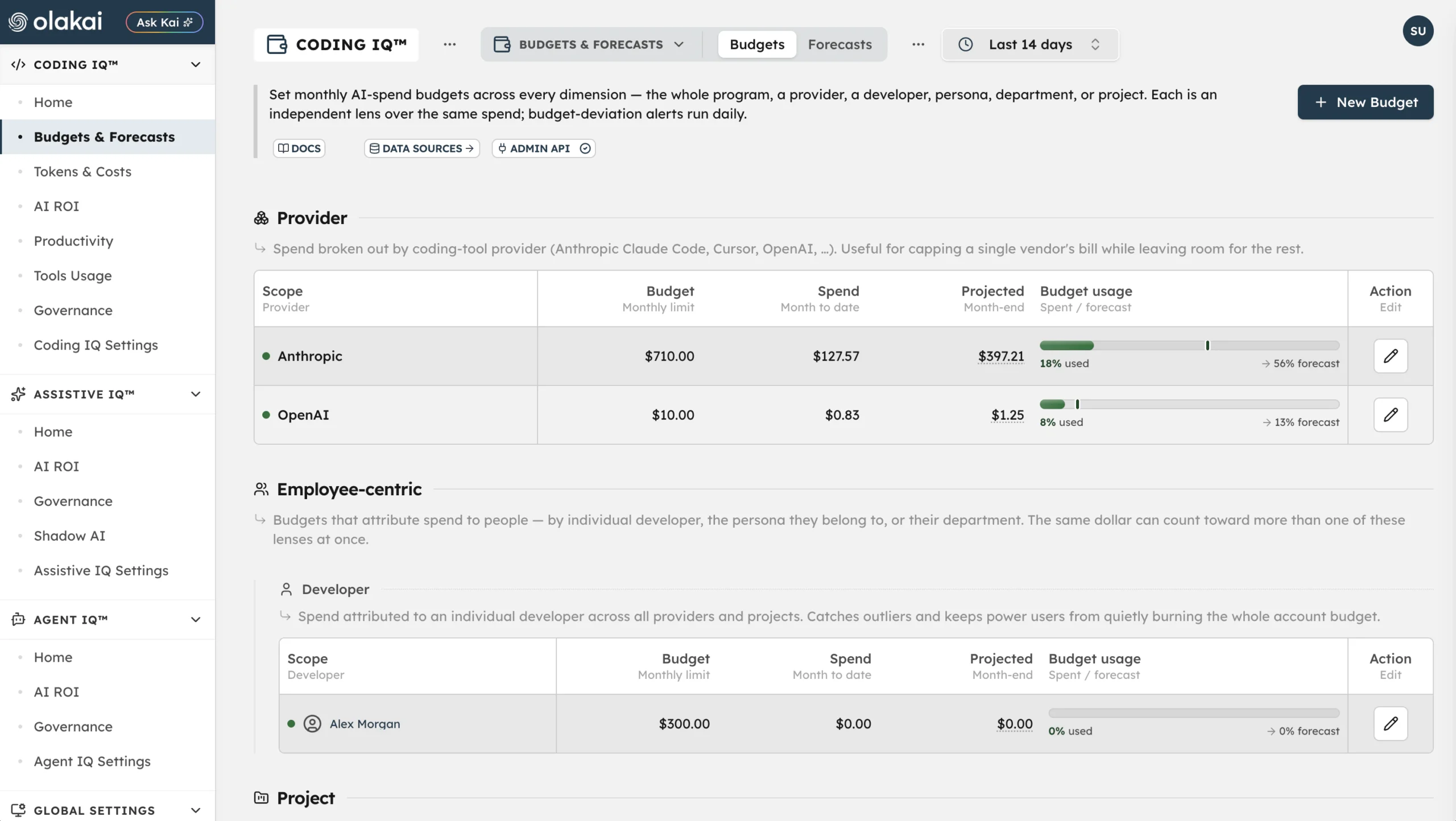

A CFO rarely discovers an AI spend problem from a dashboard. They discover it from an invoice, weeks after the spending already happened, with no window left to do anything but ask engineering what happened. Olakai’s Budgets feature inside AI Spend Governance exists specifically to close that gap — not by promising a smarter forecast, but by being honest about what a budget actually is and firing an alert while there’s still time to act on it.
Budgets are lenses, not a partition
The single most important thing to understand about Olakai’s budgets is also the thing most competing tools obscure: budgets do not partition spend. They are independent, overlapping lenses over the same dollars. The same charge can count toward a developer’s budget, their department’s budget, the provider budget, and the program budget, all at once. If you add up every individual budget on the page expecting the total to match your program spend, it won’t — and that’s by design, not a bug to file a ticket about.
Budgets are organized into four groups. Program is the master ceiling — every developer, every provider, every project rolled into one account-wide cap. Provider lets you cap a single vendor, like Anthropic or Cursor, without touching anyone else’s spend. Employee-centric budgets attribute spend to people — an individual developer, the persona they belong to, or their department — with the same overlap rule: a shared engineer’s spend counts fully against every relevant lens. Project groups shared service keys into named cost centers, with developers who belong to multiple projects contributing their full spend to each one rather than having it split proportionally.
What budgets don’t track, and why that’s deliberate
Budgets only track per-token, cost-bearing providers — Anthropic, Cursor, and OpenAI. GitHub Copilot is excluded outright, because its pricing is seat-based rather than usage-metered, and a per-token budget mechanism has nothing to measure against a flat subscription fee. Spend that can’t be attributed to a specific person still counts toward the program and provider totals, but drops out of the developer, persona, and department lenses entirely — which means per-entity totals can legitimately be lower than the program total, and that’s worth knowing before a CFO tries to reconcile the two and assumes something’s broken. The same per-provider precision shows up in how Olakai handles Google Vertex AI cost data, which lags behind usage by design rather than pretending to be real-time when it isn’t.
Budgets extend naturally into Projects, Olakai’s term for a cost center: a named bucket that groups shared service API keys, member developers, and owned repositories under one monthly limit. Total project cost is service-key spend plus member-developer token spend, and — consistent with the overlapping-lens rule everywhere else — a developer who belongs to more than one project contributes their full token spend to each project they’re in, not a proportional split. Archiving a project unassigns its keys and removes its budget and alert rules, but never deletes the underlying spend history; only the grouping goes away.
The forecast that’s already live, and the one that isn’t yet
Every budget carries a Projected month-end figure built the same way: the recent daily spend rate, extended across the remaining days of the month, added to spend so far, with a confidence signal that reflects how steady daily spend has actually been. It’s a run-rate projection, not a model of growth or seasonality — a distinction Olakai is upfront about, the same way it’s upfront about the 30-day spend projection on the main AI Impact Dashboard being a straight-line extrapolation rather than a real forecast. Budgets are evaluated once daily, right after the cost-import job pulls fresh provider spend, and saving a budget automatically provisions the alert rules behind it — nothing extra to configure.
Two kinds of alerts come out of that evaluation. The first is a threshold alert: actual month-to-date spend crosses a configurable percentage of the budget — 50%, 80%, or 100%. The second, and the more useful one, is a forecast alert: the run-rate projection is on track to exceed the limit by month end, even if the account isn’t over budget yet today. That second alert is the actual point of the feature — catching a trajectory early enough to still change it, rather than confirming after the fact that the month already went over.
Worth being precise about scope here: Olakai also has a separate, standalone Forecasts tab planned for what-if scenario modeling across budget dimensions — a different, more ambitious feature for testing hypothetical spend trajectories before committing to them. As of this writing, that tab isn’t live yet. What’s covered above — the run-rate projection and the two alert types built directly into the Budgets page — is shipped and running today; the scenario-modeling tool is a separate thing worth revisiting once it ships.
Why the overlap is the right design, not a shortcut
It would be simpler to build budgets that partition spend cleanly — every dollar assigned to exactly one bucket, everything adding up neatly on a summary slide. It would also be wrong for how AI spend actually happens inside a real engineering org, where the same developer’s usage genuinely belongs to their department’s headcount planning, their manager’s persona-level benchmarking, the vendor contract renewal conversation, and the specific project that consumed it — four legitimate, simultaneous questions about the same dollar. Building four separate, non-overlapping ledgers to answer four different questions would mean picking one authoritative answer and getting the other three wrong. Overlapping lenses let all four questions get an honest answer from the same underlying spend data, at the cost of a program total that doesn’t equal the sum of its parts — which is exactly the tradeoff a CFO should want once it’s explained, rather than discovered while trying to make the numbers reconcile.
It’s also worth knowing that budgets and projects aren’t limited to point-and-click configuration — Kai can create, edit, and archive them conversationally, gated by admin permission and a confirmation step before anything actually changes, which is a useful shortcut when there’s a long backlog of unassigned service keys to triage.
This isn’t a hypothetical risk — Uber blew through an entire year of AI budget in four months before building a reactive cap of its own. If your AI coding spend has outgrown a spreadsheet and a monthly Slack message from finance, Talk to an Expert about setting up budgets against your own provider and project data.