The invoice for your AI coding tools arrives as a single number. It is usually a large one, it is usually growing, and it tells you almost nothing. It will not tell you how many of the seats you are paying for were used last month. It will not tell you which teams got something back for the money. And when your CFO asks the only question that matters, which is whether the spend produced more engineering output than it cost, the invoice has no opinion at all.
This is the gap Olakai’s integration with Anthropic closes. Connect your Anthropic organization to Olakai and the single number becomes a per-person picture: who is using Claude Code, how much of your spend each person accounts for, what they produced while using it, and whether the seats you renewed last quarter earned their place. It takes one read-only credential and a few minutes, and nothing gets installed on a single developer’s machine to make the cost side work.
Why Claude Code is unusually easy to hold accountable
Most AI vendors make per-person measurement impossible, and not out of malice. Their administrative reporting was built for billing, so it attributes usage to credentials, projects and organizations rather than to named employees. When a tool reports that way, no amount of analysis will tell you which of your developers benefited, because the information never existed in the first place. Vendors differ enormously here, and the differences decide what any measurement platform can honestly show you.
Anthropic is one of only two AI coding vendors whose organization-level reporting attributes activity to individual people by email address. That single design decision is what makes the Claude Code picture in Olakai Agentic genuinely per-developer rather than an average dressed up as a detail. Olakai reads cost per person, token usage broken out by model, lines of code added and removed, how often a developer accepted what Claude proposed, how many sessions they ran, and how many commits and pull requests came out the other end. Everything in that list arrives from Anthropic’s own reporting. None of it is estimated, and none of it is distributed across your team by a formula.
That distinction matters more than it sounds. Several widely deployed coding assistants only publish organization-wide totals, which any vendor can divide by headcount and present as a per-user figure. The arithmetic works and the dashboard looks identical. The number simply is not true of any actual person. Olakai labels those cases as approximate wherever they occur, because a measurement platform that quietly launders an estimate into a fact is worse than no platform at all.
What the per-person view actually buys you
The first thing almost every customer finds is unused capacity. AI coding seats get bought in blocks during a rollout, assigned generously, and then never reviewed, so a predictable share of them sit idle while renewing on schedule. Olakai sorts your developers into adoption cohorts by how they actually use the tool, which turns a vague suspicion that you are over-licensed into a named list you can act on this week. Reclaiming those seats is usually the fastest money the integration finds, and it tends to pay for the measurement effort several times over before anyone has argued about productivity.
The second thing it buys you is a defensible answer on value. Because Olakai sees both what Claude Code cost per developer and what shipped in your version control system, it can line the two up: cycle time on AI-assisted work against the baseline, output per developer before and after adoption, and the business impact expressed in the dollar terms a board expects. This is also where a lot of vendor-supplied reporting goes wrong, which we have written about at length in the case of acceptance rate as a productivity metric. Acceptance rate tells you how agreeable a model is. It does not tell you whether anything valuable reached production.
The third thing, and the one finance teams tend to care about most, is control over what happens next. Spend on usage-based AI tooling does not grow politely; it grows in steps, when a team discovers a new workflow or an agent starts running on a schedule. Olakai’s spend governance puts budgets and alerts around that growth so the finance conversation happens while there is still a decision to make, rather than six weeks later when the only available move is to apologize for the variance.
Honest numbers beat flattering ones
Here is the part of this integration we are proudest of, and it is a feature that consists of refusing to show you something. Claude Code generally runs against a subscription rather than a metered bill, so a developer’s individual session has no invoice attached to it. Many tools in this category will nonetheless multiply the tokens in that session by a published rate and print the result as the session’s cost. The number looks precise, it adds up neatly across a quarter, and it bears no relationship to what your company actually paid.
Olakai used to show per-session cost and return figures for Claude Code and then removed them, because dividing real value by a fictional cost produces a confident ratio that cannot survive scrutiny. What replaced them is the figure your finance team can reconcile: the seats actually active on each plan, multiplied by what you pay for that plan, aggregated over the period you are looking at. Prices come pre-filled from Anthropic’s published rates and can be adjusted when you have negotiated something different, and annual contracts are converted to their monthly equivalent. Return is then reported against that real cost at the account level, where a real cost exists. It is a less impressive-looking dashboard and a far more useful one, and it is the difference between a metric you can defend in a board meeting and a metric that collapses the first time someone checks it against the actual bill.
What it will not tell you
Two limits are worth knowing before you set expectations internally, and both come from how organization-level reporting works rather than from anything Olakai chose.
Personal subscriptions stay invisible. A developer paying for their own individual Claude plan does not appear in your organization’s reporting, because they are not part of your organization as far as the billing system is concerned. Olakai will account for them against a default you set, and the gap is a procurement question rather than a measurement one.
Enterprise seats are counted, not priced. Enterprise agreements are negotiated individually and have no published per-seat rate, so Olakai includes those seats in the usage tally and contributes nothing for them to the cost total unless you enter your own contracted figure.
Teams that want detail below the seat level, meaning what happened turn by turn inside individual Claude Code sessions, can add that separately through a lightweight setup developers run themselves. It is optional, it is independent of the cost reporting described above, and it is the right conversation to have after the first picture is already in front of you.
One vendor is a start, not the goal
Almost no engineering organization runs a single AI coding tool. The common pattern is two or three in parallel, bought by different teams at different times, each with its own console, its own billing model and its own flattering view of its own contribution. Comparing them from inside those consoles is not possible, which is precisely why the comparison never happens and why renewal decisions get made on anecdote.
Olakai is vendor-neutral by design, and the Anthropic connection sits alongside the same reporting for the other major providers and coding assistants on one integrations surface. The point is not that we can show you Claude Code. The point is that we can show you Claude Code next to everything else you are paying for, on the same definitions, so that “which of these is worth renewing” becomes a question with an answer. Where your organization measures value differently from the defaults, custom KPIs let you encode your own definition rather than adopting ours.
Where to start
If you lead engineering, start with the adoption picture, because the idle-seat finding is immediate, uncontroversial and funds everything that follows. If you own the budget, start with cost per developer and the seat reconciliation, which is the first version of this story that will survive a conversation with finance. And if you are running an AI program across the whole company, the useful move is to connect Anthropic alongside your other providers at the same time, so that your first report compares vendors instead of describing one.
Setup needs an administrator on your Anthropic organization to issue one read-only credential from the Anthropic console, which Olakai uses solely to read usage and cost. It is never used to send prompts or change anything in your environment. Reporting begins populating on the next daily cycle, and you can preview the dashboards with sample data before committing a real credential.
The organizations that will still be funding AI coding tools in two years are not the ones with the largest deployments. They are the ones who can say, with evidence, what the last deployment returned. That is the entire job of a measurement layer, and it is why Olakai exists as a vendor-neutral system of record across every AI tool you run rather than as another console to check. Talk to an expert and we will walk through what your own Claude Code spend looks like once it is attributed to people instead of to an invoice.
In September 2025, Anthropic published something most vendors would have kept to themselves. Its Economic Index report, built on a million Claude.ai conversations and a million API transcripts from August 2025, found that “77% of business uses involve automation usage patterns, compared to about 50% for Claude.ai users.” Same company, same models, same week. Through the API, roughly three quarters of the work was AI completing tasks with little human involvement. Through the chat interface, it was about half.
That gap is the most useful number in enterprise AI right now, and not for the reason it usually gets quoted. It says the split between AI that replaces work and AI that expands what people can do is not a property of the model. It is a consequence of how you deployed it. Two companies can buy the same license, point it at the same employees, and end up with entirely different mixes, which means the mix is a decision somebody in your organization is making, probably without knowing they are making it, and almost certainly without measuring the result.
The argument everyone is having is already over
The automation-versus-augmentation distinction is not new. Erik Brynjolfsson drew the line cleanly in 2022: “When AI augments human capabilities, enabling people to do things they never could before, then humans and machines are complements,” whereas “when AI replicates and automates existing human capabilities, machines become better substitutes for human labor.” He also named the trap, which is assuming that productivity gains mostly come from the substitution side. Most of history says otherwise.
Four years on, the strategic question has largely been settled in public. Analysts, consultancies and CEO surveys have converged on the view that the augmentation side is the bigger and more durable prize, and that treating AI purely as a headcount lever tends to disappoint. You do not need another post arguing that case, and this is not one. The interesting problem is what happens next, because an organization can agree completely that augmentation matters more and still be structurally incapable of proving any of it happened.
Only one of the two halves has a baseline
Automation ROI is a subtraction problem, and subtraction problems are comfortable. A task existed, it took a measurable amount of time and money, and now it takes less. You know the denominator because you were paying it last year. Every metric that gets presented confidently in a board meeting has this shape, including the ones we build: cost per pull request, cost per execution, cycle time on AI-assisted work, tickets deflected, cost per outcome. They all compare the present against a documented past.
Augmentation has no such comparator, by definition. If a team is now producing analysis that nobody in the company produced before, there is no prior cost to subtract from, no baseline year, no line item that used to carry it. The work did not get cheaper. The work started existing. Ask what the ROI was and the honest answer is that the question is malformed, which is a terrible thing to say to a CFO who has just approved the spend.
This is not a gap in enterprise discipline. It is a gap in the economics itself. The empirical literature on AI and work, from task-substitution models through the field experiments on knowledge work, measures augmentation as a delta on tasks that already existed. Faster, better, cheaper versions of work someone was already doing. None of it has a method for valuing output categories that only exist because the tool exists. The one paper that confronts the problem directly, Coyle and Poquiz’s Making AI Count for the NBER in October 2025, concludes that “current statistical frameworks would likely struggle to capture” generative AI’s full economic impact, and offers the right analogy for why. Input-output data from the industrial revolution would have shown rising coal tonnage and cotton volumes while revealing nothing at all about the transformation in how production worked. As they put it, “the input-output relationship will not necessarily show the transformation, but rather, eventually, its consequences.” You cannot see a new category from inside the measurement frame built for the old one.
Automation
Augmentation
What changes
Existing work costs less
New work becomes possible
Baseline
Last year’s cost per task
None exists
Natural metric
Cost per unit, time saved
Adoption depth, outcome KPIs
Who sponsors it
Finance, operations
Function leaders, Head of AI
Board reception
Credible, defensible
Treated as anecdote
Where it shows up
Agents, pipelines, coding tools
Chat, copilots, embedded AI
The two halves of AI value behave differently under measurement, which is why they need different instruments.
What the asymmetry does to budgets
Money follows measurability, and you can watch it happen. BCG’s AI Radar 2026, a survey of nearly 2,400 executives including 640 CEOs, found corporate AI spending on track to roughly double from 0.8% to 1.7% of revenue, with leading organizations putting around 60% of their AI budgets into agentic development, and over 90% of organizations planning to maintain or increase investment regardless of near-term returns. The budget is concentrating on the half with a clean denominator, which is rational behaviour from people who have to defend a number.
The returns on that half are not arriving as promised. Bain’s 2026 survey of 951 global companies found that “nearly 40% of companies that measured AI cost savings landed below 10%, despite targeting 11% to 20%,” and that only 7% are running fully autonomous agents in production, with human approval remaining the dominant operating model at 38% of respondents. Bain also notes that 90% of those same companies are increasing budgets again anyway. So the automation thesis is underdelivering against its own targets, the augmentation thesis cannot be held to a target at all, and spending is going up in both cases. That is not a technology problem or a change-management problem. It is what happens when an enormous investment is governed by one metric that is measurable but disappointing and another that is promising but unmeasured.
Make the ratio a number you track
The practical fix is less exotic than the economics suggests. You will not get a dollar figure for work that never existed before, and chasing one wastes a quarter. What you can get, and what nobody is currently putting in front of a board, is the ratio itself: for each tool, team and vendor, what share of your AI usage is completing work on its own, and what share is a person working alongside it. Anthropic can compute that for its own products. Almost no enterprise can compute it for its own stack.
Tracked over time, that one ratio answers questions that currently get answered by instinct. Whether a function is drifting toward autonomy faster than its governance is ready for. Whether a team that looks expensive is expensive because it is experimenting at the frontier or because nobody has looked at its licenses in six months. Whether the agentic programme you funded at 60% of budget is actually running autonomously or is still routing every action through a human approver, as it is for most of Bain’s respondents. These are governance questions as much as finance questions, and they are unanswerable without a record of what your AI actually did.
That record is the product category Olakai occupies, and the two halves map onto it directly. Olakai Agentic instruments the automation side, measuring what agents and coding tools execute, what each execution costs, and how cycle time moves against the documented baseline. Olakai Assistive instruments the augmentation side across chatbots, copilots and more than 800 embedded AI tools, where the meaningful signals are behavioural rather than financial: who is using what, how deeply, and whether usage is concentrating in a few power users or spreading. Because both run on one vendor-neutral measurement layer rather than on each vendor’s own console, the ratio between them is something you can actually compute instead of estimate.
Measuring the half that has no baseline
Three instruments do most of the work on the augmentation side, and none of them pretends to be a cost comparison. Adoption cohorts sort people into power, casual, new and idle usage, which measures depth of engagement rather than output volume, and tells you where capability is genuinely compounding. AI fluency measurement looks at how people work with AI rather than how much the AI produced, which is the closest available proxy for whether anyone is handing the tools bigger goals. And Custom KPIs are where augmentation value actually gets booked, because they let a business define an outcome metric that has no historical equivalent and then hold AI usage against it. We covered that architecture in detail in the four-layer system behind Olakai’s metrics.
Being specific about what this does and does not deliver matters more here than usual. None of these three produce a defensible dollar return on new work, and any vendor claiming otherwise is selling you a number they invented. What they produce is evidence that the capability is real, concentrated, growing or stalling, plus a framework for attaching it to an outcome the business already cares about. That is a weaker claim than a cost-per-task saving and a far stronger one than a testimonial, which is exactly the right place for it to sit.
Where to start
Pick one function and compute its ratio for a single month. Not a dollar figure, just the split: what proportion of that team’s AI usage ran autonomously, and what proportion had a person in the work. Most organizations discover two things immediately. The automation share is higher than anyone expected, as Anthropic’s own API number suggests it would be, and the augmentation share has never been reported to anyone. Then ask who decided that mix. If nobody can answer, the mix was not a strategy, and you have found something more actionable than another ROI estimate. For finance leaders carrying the AI line on the P&L, our CFO view walks through how this reporting fits into an existing budget cycle, and AI metrics that matter covers which of these numbers survive contact with a board.
The organizations that come out of this period ahead will not be the ones that picked the correct side of the automation and augmentation debate. They will be the ones that could tell you, with a record behind it, which one they were actually doing. Build that measurement layer with Olakai, or keep approving a doubling AI budget against one number that disappoints and one that does not exist.
Talk to an expert about measuring both halves of your AI investment in one system of record.
Somewhere in your company, an automation is running right now that nobody in finance or security has ever seen. An operations lead built it in an afternoon: a trigger fires when a form comes in, a model reads the submission, scores it, drafts a reply, and routes the result to a spreadsheet and a chat channel. It has run a few thousand times since. It calls a frontier model on every run. It has never appeared on an AI budget line, never been reviewed for what it sends to that model, and nobody can say whether the leads it scores are any better than the ones a person used to score by hand.
Multiply that by every team that has discovered how fast it is to build this kind of thing, and you have the shape of the next AI measurement gap. Olakai’s new n8n integration closes it. Olakai connects to an n8n instance once, with a read-only key, reads the workflow runs n8n already saves, and turns every AI step inside those workflows into a monitored, governed agent in Agent IQ, with execution cost, time saved, value created, ROI and governance compliance tracked per step. Nothing changes inside the workflows. This post is about why n8n AI agent monitoring matters now, what you get from it, and what it shows about how every Olakai integration is designed to work.
n8n AI workflows are now an AI layer, and most of it is unmeasured
n8n is not a niche developer tool anymore. The company raised a $180 million Series C in October 2025 at a $2.5 billion valuation, citing six-fold user growth and ten-fold revenue growth in a year, according to its own announcement. Seven months later, SAP made a strategic investment that roughly doubled that valuation and embedded n8n inside SAP’s own agent-building tools. In Stack Overflow’s 2026 developer survey, n8n and Make now lead Zapier as the tools developers reach for when they automate with AI agents.
What changed is the content of the workflows. A few years ago an automation moved data between systems. Today the typical flow has a model in the middle of it: an AI Agent node that reasons and calls tools, a Text Classifier sorting tickets, an Information Extractor pulling fields out of a contract, or a direct call to OpenAI, Anthropic, Gemini, Mistral or a local Ollama model. Each of those steps spends tokens, produces an output someone downstream relies on, and sends company data to a model provider. In other words, each one is an autonomous agent in everything but name, and it was built by someone whose job title does not include the word “engineer.”
That is the part that should concern the people who sign off on AI spend and AI risk. In an April 2026 survey of 200 enterprise CISOs commissioned by Nokod Security, security teams reported visibility into only 44% of the apps, agents and automations business users had built, and more than half said those business-built automations now support critical processes. The survey did not cover n8n specifically, but the pattern is the same on every platform where building is faster than reviewing. This is shadow AI in its most durable form: not an employee pasting into a chatbot, but a workflow that runs unattended, at scale, on a schedule.
Why n8n run counts are not AI ROI
Automation platforms are good at telling you whether a workflow executed. They count runs, flag failures, and report how long each run took. What they cannot tell you is what the AI inside the workflow cost, whether its output was any good, and whether the whole thing returned more than it consumed. Gartner predicted in mid-2025 that more than 40% of agentic AI projects would be canceled by the end of 2027, and the reasons it gave were escalating costs, unclear business value and inadequate risk controls. Notice that none of those is a technology failure. Every one is a measurement failure, and automation-embedded agents are the ones most likely to suffer it, because they were never set up as “AI projects” in the first place. They were set up as a Tuesday afternoon.
This is the gap Olakai was built to close: a vendor-neutral measurement layer that sits above every place AI is running, so that spend, value and risk roll up into one ROI view regardless of where the AI lives. Coding assistants, employee chat tools, custom-built agents and, now, the AI steps inside your automation platform all land in the same system of record. We wrote recently that every enterprise function has a system of record except AI. Workflow automation is where that absence is most expensive, because the volume is highest and the oversight is lowest.
What the Olakai n8n integration gives you
The integration is a one-time connection. An administrator points Olakai at the company’s n8n instance with a read-only key, and from then on Olakai reads the runs n8n has already saved, on a schedule, with nothing to change inside any workflow. Builders keep building the way they build. n8n stays the source of truth for what the workflows are called and how they are structured; rename something there and it is renamed in Olakai at the next sync. The first sync reads back two weeks of history, so the dashboard is populated the day you connect rather than starting from zero.
From that one connection, Olakai builds the inventory nobody had. Every n8n workflow that contains an AI step becomes a workflow in Agent IQ, and every AI step inside it becomes its own agent, whether that step is an AI Agent node, a Basic LLM Chain, a Text Classifier, an Information Extractor, or a direct call to OpenAI, Anthropic, Google Gemini, Mistral or Ollama. Workflows with no AI in them are ignored, because this is about measuring the AI, not auditing the plumbing. The result is a list, finally, of every place in the automation layer where a model is being called, who built it, how often it runs and what it costs.
Each of those agents then gets the same treatment as every other agent Olakai measures. Every run records which model was called and how many tokens it consumed, so execution cost is real rather than guessed, the same discipline we apply when reconciling cloud AI bills. Time saved and value created are computed from what the model actually produced, so the dollars-and-hours story a CFO wants is there per workflow and per step, not as a blended estimate someone typed into a settings page. Governance compliance is scored on every interaction, and because prompts and responses pass through the same sensitivity detection as every other Olakai interaction, the question “what are our automations sending to model providers?” has an answer for the first time. Failed runs are counted too, since they spent tokens whether or not they finished, while test runs from the editor are left out, because someone building a workflow is not the workflow doing work.
Completed is not the same as successful: measuring n8n AI output, not run status
Here is the detail that separates measurement from counting. An automation platform marks a run as complete the moment every step finishes without an error. But a run can complete and still have done nothing useful: the model hallucinated a lead, returned malformed data the next step silently accepted, or drafted a reply to the wrong person. A tool that scored every completed run as a win would inflate ROI with exactly the runs that should worry you most.
Olakai’s time-saved metric reads the content of the output rather than the status of the run. An unusable response earns zero minutes saved, and therefore zero dollars of value created, by construction. On top of that default, teams can define what “successful” means for a specific workflow with a custom KPI, the same four-layer KPI system used across the platform: the extracted fields were all present, the priority was one of the allowed values, the recipient matched the account. The ROI figure that reaches the board is then a figure for runs that worked, which is the only kind worth reporting.
How every Olakai integration works, with n8n as the example
n8n is a useful example because it shows the pattern behind all of Olakai’s integrations. We do not ask you to instrument every tool, re-platform every workflow, or wait for every team to adopt an SDK. We connect to the system where the activity already lives, read what it already records, and normalize it into one view. For coding tools, that means the admin APIs of Anthropic, OpenAI, Cursor and Google, plus your version control system, which is how Olakai detects AI coding activity without installing an agent. For employee AI use, it means the browser extension and the Microsoft 365 Copilot connection. For agents, it means the SDK where you have built your own, and now automation platforms where you have not.
The principle is the same every time: the source stays the source of truth, Olakai reads rather than writes, and every signal lands in the same ROI and governance model so that an n8n workflow, a Copilot seat and a Claude Code session can be compared on the same dashboard, in the same units. That comparability is the whole point. A CFO does not want seven vendor dashboards each proving its own value; they want one answer to “what is our AI costing, what is it returning, and where is the risk?” A CISO does not want to learn about an automation from an incident report. And a Head of AI who can see all of it in one place can finally decide what to scale, what to fix and what to retire, which is the decision FinOps for AI is supposed to enable and usually cannot.
Where to start with n8n AI agent monitoring
If your organization runs n8n, the first step is simply to connect it and look at the inventory. Most leaders we talk to are surprised by the count: the number of AI steps running in production is reliably higher than anyone’s estimate, and the spend concentrated in two or three high-volume workflows is usually larger than the budget line that was supposed to cover all of it. From there the questions get more interesting. Which workflows are generating value, and which are generating tokens? Which ones handle data that should never have reached an external model? Which ones should be scaled, because the economics are obviously good, and which should be rebuilt, because every run completes and almost none succeeds?
Those are the questions a governed AI program answers as a matter of routine. The automation layer was the last place they could not be asked. Now they can. Want to see what the AI inside your workflows is actually costing and returning? Talk to an Expert.
Picture the quarterly business review. The CRO walks in with pipeline and bookings pulled from Salesforce. The CFO has the close from the general ledger. The CHRO has headcount and attrition from Workday, the CIO has incident and asset counts from ServiceNow, and the CISO has the quarter’s access review from Okta. Nobody in the room debates whether those numbers are right. They argue about what to do about them, which is what a leadership meeting is for.
Then the Head of AI presents. The slide was built from a spreadsheet, and the spreadsheet was built from four vendor consoles, last month’s cloud invoice, a license count from procurement, and an HR extract to map API keys to teams. The total does not match the figure the CFO has for AI, because the ledger sees invoices and the consoles see usage, and nothing in the company ties one to the other. Ten minutes go to reconciling instead of deciding. That scene is playing out in most large companies right now, and it is not a competence problem. Every other function in the room is reporting from a system of record. AI is reporting from a spreadsheet, because AI is the one function that still does not have one.
The numbers say the same thing. In KPMG’s Q2 2026 AI Pulse survey of 204 US leaders at companies above $1 billion in revenue, 66% said they have AI cost monitoring dashboards and 61% have cost reviews in their approval process, yet only 26% report full, real-time visibility into what their AI costs to operate, and only 36% have any direct token or usage controls. Two thirds have a dashboard. One quarter has the record underneath it. A dashboard without a system of record is a chart of whatever happened to be exported that week.
What the nine already have in common
A system of record is the authoritative source for one kind of data, the place everyone agrees is correct when two reports disagree. Geoffrey Moore’s 2011 paper for AIIM drew the line between these transactional backbones and the “systems of engagement” people actually work in, and the distinction has held up: the engagement layer changes every few years, the records underneath it do not. We covered the definition and its three properties, authoritative, complete and durable, in What Is an AI System of Record?, so this post takes the definition as given and looks at the list instead.
Look at how each of the nine came to exist and a pattern appears. None of them was adopted because the function wanted better software. Each one arrived when a function’s spend or its risk crossed a threshold where a spreadsheet stopped being an acceptable answer to the board or the auditor. The ledger predates computers because money crossed that threshold first. CRM took hold when a sales organization’s pipeline became too valuable to live in individual reps’ notebooks. FinOps tooling appeared when cloud bills got large and variable enough that finance could no longer wait for the invoice to learn what engineering had done. AI crossed the same threshold in 2025 and 2026, as coding agents and model APIs moved from per-seat licenses to usage-based billing and the monthly figure started moving with behavior rather than with headcount. The record is late, and the rest of this post is about what it should look like when it arrives.
The ten systems of record, and what each one teaches AI
Here are the nine systems of record a large enterprise runs today, the question each one is trusted to answer, and the discipline each one established that an AI system of record has to inherit. The tenth row is the one that has been missing.
Function
System of record
The question it answers
What AI inherits from it
Sales
CRM (Salesforce, HubSpot)
What is in the pipeline, and what did we sell?
If it is not in the record, it did not happen
Finance
ERP / general ledger (SAP, Oracle, NetSuite)
What did we spend and earn, and where?
Reconcile to the real bill, allocate every dollar
People
HRIS (Workday, SuccessFactors)
Who works here, in what role, reporting to whom?
One org hierarchy for every per-team figure
Code
Git (GitHub, GitLab)
What changed, when, and who changed it?
Provenance for every line AI touched
Identity
Identity provider (Okta, Microsoft Entra)
Who is this, and what may they access?
One identity across every AI provider
IT assets
CMDB / ITSM (ServiceNow)
What do we run, and who owns it?
You cannot govern what you have not inventoried
Customer support
Ticketing (Zendesk, ServiceNow)
What did the customer ask, and how was it resolved?
Log the interaction and its outcome, not just the count
Showback, chargeback, and budgets that alert early
AI
Olakai
What did our AI do, what did it cost, and what did it produce?
All nine, applied to interactions and tokens
Ten enterprise systems of record. Nine are established; the tenth is the gap.
Visibility: the CRM and the CMDB
Every sales leader enforces the same rule, usually in those words: if it is not in the CRM, it did not happen. The rule is not about tidiness. It exists because a forecast built on deals that live in someone’s inbox is not a forecast, and because the moment one rep’s deals are allowed to live outside the system, every number downstream of it becomes negotiable. IT learned the equivalent lesson the hard way with the configuration management database: you cannot patch, secure, or decommission a server you do not know you run, so the inventory comes before the policy. Applied to AI, those two rules are the whole case against tolerating shadow AI. The usage that happens in unsanctioned tools is not a side issue to be cleaned up later; it is the part of the record that is missing, and every adoption figure, cost figure and risk assessment is wrong by exactly that amount. Olakai treats the inventory as the first job, maintaining an app catalog of more than 800 AI tools and recording what employees do in them, so that the record is complete before anyone is asked to trust a number from it.
Money: the ledger and FinOps
The general ledger established two habits that nobody in finance questions any more. The books close, on a schedule, and the closed figure is the figure. And every dollar carries a cost center, so that “what did we spend” always has an answer to “on what, and for whom.” Cloud FinOps added a third habit two decades later: because engineers make cost decisions thousands of times a day without seeing the invoice, the spend has to be shown back to the team that caused it while they can still change course, and budgets have to warn before the month is over rather than report after it. AI spend violates all three habits by default. The provider’s console shows an estimate, the invoice arrives later with a different figure, and the two are rarely reconciled, which is why Olakai reconciles its usage data against the billing export for providers like Google Vertex AI rather than multiplying tokens by a list price and calling it cost. Attribution is harder than it was for cloud because API bills arrive by key, not by person, so a shared key is unallocated spend until someone maps it. And a budget in any analytics platform can only alert, never cap, so the useful control is the forecast alert that fires when the daily run rate points past the limit. We went through what carries over from the cloud playbook and what does not in FinOps for AI, and how Olakai’s budgets and alerts are built around that constraint.
People and identity: the HRIS and the identity provider
Workday’s quiet achievement is that there is one org chart. Finance, IT and the business all allocate against the same hierarchy of departments and managers, so a per-team figure from one system can be laid next to a per-team figure from another and the teams line up. The identity provider did the same for people: one identity, carried into every application, so that an access review can ask “what can this person reach” and get one answer rather than forty. AI breaks both. Each provider has its own notion of a user, a developer might hold an Anthropic key, an OpenAI key, a Cursor seat and a GitHub Copilot license under four spellings of their name, and none of those vendors knows the org chart. An AI system of record has to resolve them to one person in one department before any per-team or per-developer figure means anything. Olakai does that mapping across its provider integrations and then reports against the organization’s own units, which is what makes figures such as cost per employee and the power, casual, new and idle adoption cohorts comparable from one team to the next.
Provenance, outcomes and attribution: Git, ticketing and marketing automation
The last three teach the part most AI reporting skips. Git made provenance a default: every line of code has an author, a timestamp and a reason, and “who changed this and why” is a command, not an investigation. The support desk made the outcome part of the record, because a ticket count tells you nothing while a ticket with a resolution and a time-to-resolve tells you how the function is performing. And marketing automation spent fifteen years on the hardest problem of the three, attribution, connecting a touch to the revenue it eventually produced, imperfectly but well enough to fund the next campaign. AI needs all three at once. For coding tools, Olakai reads the pull request history that Git already keeps and identifies which changes AI touched without installing anything on developer machines, so provenance comes from the system of record engineering already trusts. For assistants and agents, it records the interaction and what came back, not only that an interaction occurred. And for the question the board actually asks, it ties that activity to KPIs defined in the business’s own terms, which is the attribution problem again, with tokens where the ad spend used to be.
The tenth row
Put the nine lessons together and the tenth system of record writes its own specification. It has to be complete, so anything outside it is treated as a gap rather than ignored. It has to reconcile to the invoice and allocate to a cost center. It has to use the organization’s real hierarchy and resolve every provider’s idea of a user to one person. It has to keep provenance and outcomes, not activity counts, and it has to attribute both to business results. And it has to do this across every vendor, because no function runs all of its AI through one provider and a record kept by a vendor will only ever describe that vendor. That last requirement is the one the market keeps getting wrong. Every AI vendor ships a dashboard, and every one of those dashboards is a system of engagement for its own product. None of them is the ledger.
That is the gap Olakai was built to fill: the vendor-neutral system of record for the entire AI stack, capturing every interaction and outcome from coding agents, workforce assistants and autonomous agents, down to the token and its cost, and structuring it by user, team, department, project, agent, model and vendor. Olakai Agentic covers the coding tools and agents, Olakai Assistive covers the assistants employees use all day, and both write to the same record. The point of a system of record is not the chart on top of it. It is that when the CFO and the Head of AI walk into the same meeting, they are reading the same number, and the ten minutes go to the decision.
Why AI was the exception, and why that ends now
AI did not get a system of record on schedule for three structural reasons, all covered in more depth in the definitional post. Nobody types into it, so completeness depends on coverage rather than on discipline. It spans vendors by design, so no single supplier can keep it. And its unit is the interaction and the token, so the volume is millions of events a month rather than thousands of transactions, which rules out the manual reconciliation that got finance through the first two years. Add the fact that AI is the first function whose spend crossed the threshold before its record existed, rather than after, and the spreadsheet in the opening scene stops looking like a failure of the person holding it. It is the predictable result of asking one function to report without the infrastructure every other function was given decades ago.
What ends the exception is the same thing that created the other nine. The spend is now large enough, and variable enough, that the board will not accept an estimate, and KPMG’s finding that three quarters of billion-dollar companies lack real-time visibility into AI cost is the number a board member will quote back. Dashboards were the first response, and the survey shows how far they got. The record is the second, and the enterprises that build it in 2026 will be the ones whose AI reporting looks like their finance reporting rather than like their expense reports. The signals an AI system of record should carry, and which ones a CFO will actually read, are the subject of a separate post.
Where to start
Nobody rolled out an ERP in a week, and an AI system of record does not need to cover all ten disciplines on day one. Start with the function where the spend is largest and most variable, which in most companies today is AI coding tools. Connect the providers you already pay, map the keys to people and the people to teams, and reconcile one month of usage against the invoice. The first time the Head of AI and the CFO present the same figure, the rest of the organization will understand what the record is for, and the remaining disciplines follow the way they did for every other function: because the alternative is a spreadsheet nobody trusts.
If you would like to see what the tenth row looks like with your own providers connected, talk to an expert.
In June 2026, Uber’s CTO told employees that the company’s annual AI budget was gone, four months into the year. The fix that followed was a flat cap of $1,500 a month per employee for each agentic coding tool, with exceptions by approval. When a reporter asked what the spend had bought, the COO said it was “very hard to draw a line” from the tokens to the features they produced. We wrote about the cap at the time, but the more interesting fact is the one underneath it: Uber has one of the most mature cloud cost practices in the industry, and that practice did not see this coming.
That is the FinOps for AI problem in one company. The discipline is not missing. The FinOps Foundation‘s State of FinOps 2026 survey, drawn from 1,192 practitioners responsible for more than $83 billion in cloud spend, found that 98% of them now manage AI spend, up from 31% two years earlier, and that “FinOps for AI” is the top forward-looking priority on their list. The 2026 edition of the FinOps Framework added it as a dedicated technology category. Finance teams are not ignoring the AI bill. They are applying a playbook written for cloud to a cost that does not behave like cloud, and the playbook is failing in specific, predictable places.
What carries over from cloud FinOps
Most of the framework survives the move. The three-phase lifecycle of Inform, Optimize, and Operate is exactly the right shape for token spend, and the principles hold up better than their critics expect. Teams still need to collaborate, business value still drives technology decisions, and everyone still owns their own usage. The Foundation has even rewritten its sixth principle, which used to be about taking advantage of the variable cost model of the cloud; it now says “the cloud and other technologies with similar consumption models,” which is as close as a standards body gets to admitting that tokens are the new unit of variable cost.
What also carries over is the thing cloud FinOps got right first: cost is an engineering decision made thousands of times a day by people who never see the invoice, so the feedback has to reach them while they can still change the decision. That instinct is correct for AI. The problem is that four assumptions underneath the cloud version of it are wrong for tokens, and each one breaks a different phase of the lifecycle.
Inform breaks first: there is no single bill
Cloud FinOps rests on one authoritative artifact, the billing export. It is late by a few hours, but it is complete, it is tagged, and everything reconciles to it. AI spend has no such artifact. In practice a finance team is looking at three different numbers that describe the same usage. There is an estimated figure, tokens multiplied by a list price, which is the only number available in real time. There is the provider’s billed figure, which arrives later and does not always match the estimate, because cached reads and batch discounts are priced differently from fresh input. And there is an allocated figure, the share of the real bill attributed to a team or a person, which is an estimate weighted against the invoice. We built Olakai Agentic to keep those three apart on purpose, because adding them together, or quoting one as if it were another, produces a number that describes nothing.
Timeliness is the second casualty. Google Vertex AI‘s billing export to BigQuery typically runs 24 to 48 hours behind usage, which we documented in detail when we built the reconciliation for it. AWS cost reports carry a comparable lag. The FinOps principle that data should be “accessible, timely, and accurate” is intact; what changed is that for AI you have to choose two of the three and say which two you chose.
Allocation breaks next: tags attach to keys, not people
The cloud allocation model is tag discipline. Every resource carries a cost center, and showback follows. Token spend arrives, in the Foundation’s own words, as “aggregate consumption by API key at best.” A shared service key for a team of forty developers is one line on the invoice, with nothing on it that says who used it. Gartner analyst Marco Meinardi put the problem plainly at FinOps X in June: “The metadata is not there. We have to build it into the application.” Finance cannot build it into the application, which is why 36% of the finance leaders in a February 2026 survey of 500 companies named “lack of financial attribution” as the reason they could not measure AI return.
Two things follow for the practice. The first is that attribution coverage becomes the leading KPI, ahead of total spend: the share of the bill that sits in a named cost center, with the biggest unassigned keys listed next to it so that each one is a single assignment away from being attributed. A project breakdown on 9% coverage describes 9% of the bill, and a dashboard that hides that fact is lying with a pie chart. The second is that AI allocation is not a partition. The same developer’s spend legitimately belongs to their department’s headcount plan, their manager’s benchmarking, the vendor renewal, and the project that consumed it, four questions about the same dollar. Olakai’s budgets are therefore overlapping lenses rather than buckets, and the per-team totals are not supposed to sum to the program total. A CFO who expects cloud-style reconciliation needs to hear that before the meeting, not during it.
The hybrids make it worse. Seat-licensed tools such as GitHub Copilot have nothing for a per-token budget to measure, so they fall out of usage-based reporting entirely and belong with license utilization instead, where the question is how many seats are idle. Cursor moved from a flat subscription to a dollar credit pool tied to API cost in June 2025 and had to refund customers whose bills multiplied; Anthropic moved enterprise customers to a seat fee plus pre-committed token consumption in April 2026. A single engineering org can now be paying three pricing models for the same category of tool, and a chargeback built on any one of them is wrong for the other two.
Optimize breaks in the middle: the rate levers are smaller and the usage levers are larger
Cloud optimization is mostly a rate exercise. Reserved instances, savings plans, and committed-use discounts can take a third off a bill without anyone changing a line of code. The token equivalents exist but are narrower: Anthropic and OpenAI both discount batch workloads by half, cached prompt reads cost roughly a tenth of fresh input on most Anthropic models, and provisioned throughput on Azure is the closest thing to a reservation. None of them is a one-time procurement decision. Caching has to be designed into the prompt, and as we found when DeepSeek raised its cache prices, the discount itself is a variable the provider can move.
Meanwhile the usage side is doing something cloud never did. Gartner expects the cost of running a trillion-parameter model to fall by more than 90% between 2025 and 2030, and in the same breath says agentic queries consume five to thirty times the tokens of a simple prompt, so “those applications are going to be more expensive, not less.” That is the arithmetic behind the pattern we described in Your AI Got Cheaper. Your Bill Didn’t. Rate optimization in AI is worth doing, but the money is in the usage: model right-sizing, which the Foundation’s tokenomics working group puts at 60% to 90% savings on the affected calls, and the discipline of not running a reasoning model with three tool calls where a direct prompt would do. Gartner’s forecast for the end state is blunt. By 2028 it expects AI coding token costs to match the average developer salary, and it already counts 6% of organizations spending more than $2,000 per developer per month. Its own conclusion is that “token discipline will not emerge through developer choice alone.”
Operate breaks last: a budget alerts, it does not cap
In cloud, a budget is a soft control backed by hard ones. Quotas, service limits, and autoscaling ceilings mean overspend has a physical boundary. Token spend has almost none. An API key with a card behind it will keep answering requests until the card declines, and a retry loop in an agent will happily spend a week’s budget in an afternoon. Uber’s response was the cloud reflex, a hard cap, and it arrived after the money was gone. The practice that works instead is a forecast alert: a run-rate projection of month-end spend, recomputed daily as provider data lands, that fires when the trajectory will exceed the limit even though today’s total is still under it. That is how Olakai evaluates every budget, at the program, provider, department, persona, developer, and project level, and it is worth being precise about what it does. It changes who gets told, early enough to change the trajectory. Nothing in it throttles a request, and a finance team that wants a hard stop should run a gateway underneath it, not instead of it.
The piece cloud FinOps never had to solve
Every break above is fixable inside the framework. The one that is not is the denominator. Cloud FinOps could stop at cost per unit of infrastructure because the business value of the infrastructure was somebody else’s problem. AI does not allow that separation, because the unit of cost and the unit of work are the same token. Forrester’s read of FinOps X this year was that “AI economics must evolve from a cost-based discipline to a value-based one,” and the numbers explain why: McKinsey finds only 39% of companies report any EBIT impact from AI, and in the DoiT survey 15% of finance leaders could calculate AI return without major bottlenecks. A cost dashboard with no value column cannot tell whether a team spending $40,000 a month on coding agents is the best or the worst investment in the company.
This is where we think the discipline is heading, and where we built. Olakai Agentic measures spend and return in the same system: coding tool return as AI Equivalent Engineers against a fully loaded engineer cost, agent return as value created over execution cost, with the assumptions configurable by finance rather than inherited from a vendor. The metric a CFO should be watching is cost per outcome, with cost per token as its input, not its conclusion. That is the version of FinOps for AI that survives a board meeting, and it is the one that makes AI ROI measurement and spend governance a single problem rather than two adjacent ones.
Where to start
Keep the lifecycle and the principles; they are right. Then run the four checks in order. Count attribution coverage before you quote a total. Decide which of estimated, billed, and allocated you are showing, and label it. Move optimization effort from rate to usage, starting with the agentic workloads where token volume is growing fastest. And replace the cap you would reach for after the next overrun with a forecast alert you set before it. If your AI spend practice is a cloud FinOps tool, a provider console, and a spreadsheet that reconciles them a week late, talk to an expert and we will walk through what the same bill looks like with a denominator, in the form a CFO reviewing AI spend can act on.
Almost every enterprise finance team is now in the AI cost business, and almost none of them can see the whole bill. The FinOps Foundation’s State of FinOps 2026, drawn from 1,192 practitioners representing more than $83 billion in annual cloud spend, found that 98% now manage AI spend, up from 31% two years earlier. Their number one challenge was not negotiating rates or forecasting growth. It was visibility: simply seeing what AI costs, where it goes, and who incurred it. One practitioner in that research put it more bluntly than any vendor would: “Is your AI providing value? No one can answer that question yet.”
Corroborating evidence is easy to find, though it deserves a careful read. In a survey of 500 finance and technology leaders commissioned by a cloud cost vendor, 79% reported AI-related cost overruns in the past twelve months, and the highest overrun rate in the dataset, 89%, belonged to organizations rating their own FinOps practice most mature. That looks like a paradox, and it is worth resisting the obvious interpretation. The likeliest explanation is not that discipline makes things worse but that mature programs detect overruns the rest never notice. Either way the conclusion holds: more tooling and more process did not produce a reliable picture of AI cost.
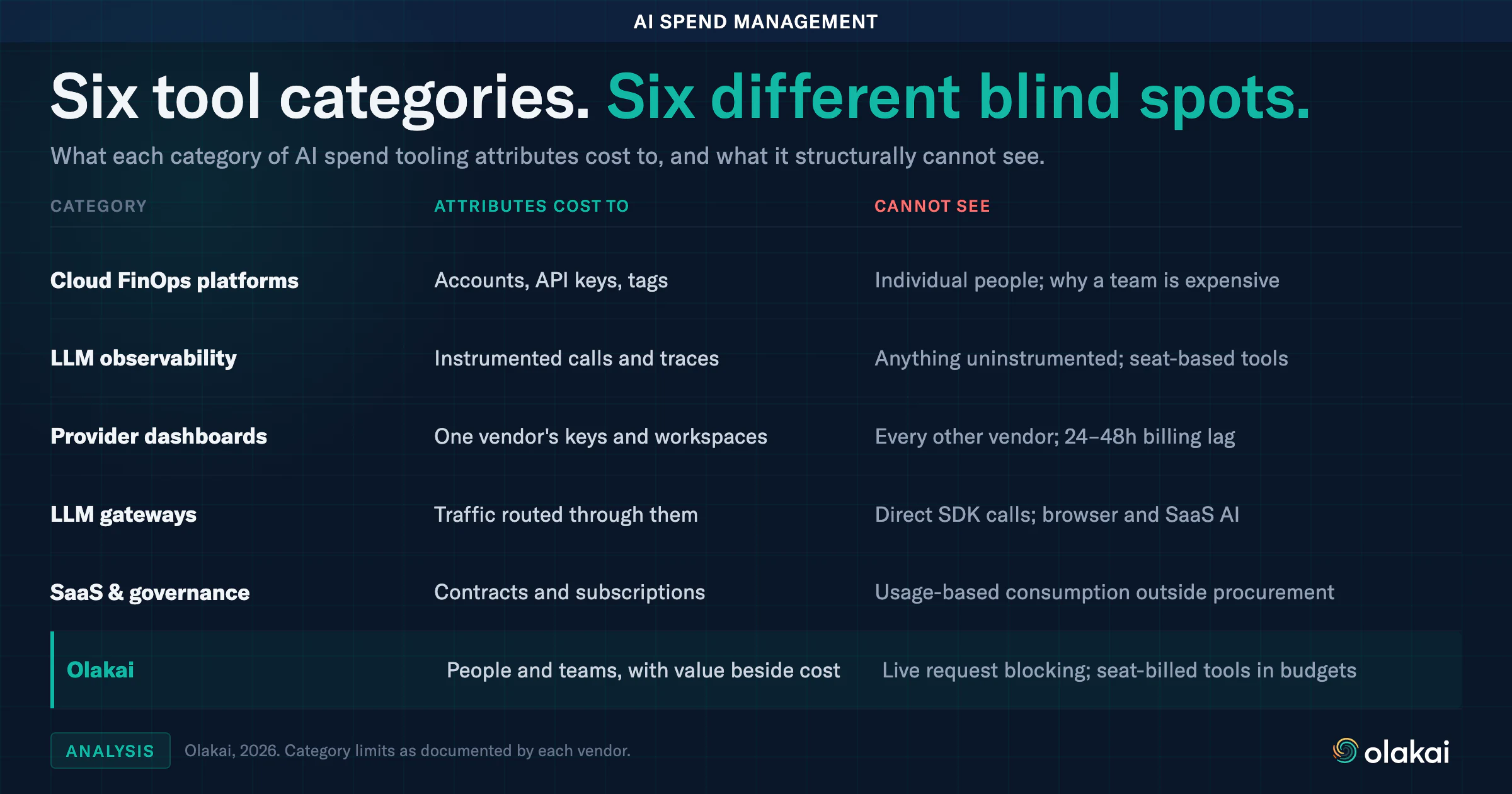
The discipline now has a name, AI FinOps, and a growing tool market behind it. AI spend management tools sit at three layers: what the bill says, arriving days after the money is gone; what the application says, inside code someone deliberately instrumented; and the layer budgets are actually decided at, which is who spent it and whether the output justified the cost. Below are the six categories enterprises genuinely deploy. Each solves a real slice of the problem, each has a blind spot that is structural rather than a missing feature, and the last one is ours, held to the same standard.
1. Cloud FinOps Platforms
Vantage, CloudZero, Finout, and nOps come at AI spend from the cloud bill. They ingest AWS, GCP, and Azure billing exports and, increasingly, native usage data from OpenAI, Anthropic, Databricks, and Cursor, then apply allocation rules mapping spend onto teams, models, or customers. Several now offer token-level granularity rather than a monthly invoice line, with anomaly detection that flags a spike before the billing cycle closes. For anyone already running a mature cloud cost practice, extending it to AI is the obvious move.
The structural limit is what they attribute spend to. They allocate against accounts, API keys, and tags, never against people, so attribution quality depends entirely on tagging discipline established before the money was spent. In practice that discipline decays: a shared service key, an untagged project, or a developer who provisioned access outside the standard path all land in an unallocated bucket. Because these platforms read billing records rather than the interactions underneath them, they can tell you a team is expensive but never why. That matters when the fix for one costly team is coaching and the fix for another is a smaller license count.
2. LLM Observability Platforms
Langfuse, Helicone, and Datadog’s LLM observability product start at the application instead. They trace individual calls, record prompts and responses, and attach token counts and cost to each one, producing genuinely precise per-model analytics and, in some cases, budget alerts. Helicone routes through a proxy, so setup is close to a base URL change; Langfuse and Datadog rely on SDK instrumentation inside the application. Engineering teams like these tools because the output is specific enough to act on, in that an expensive prompt template shows up as an expensive prompt template.
The blind spot follows from how the data arrives. These platforms see exactly what someone remembered to instrument and nothing else. A one-off script, an analyst’s notebook, a vendor tool calling a provider API directly, or a newly shipped service whose owner skipped the wiring are all invisible, and invisible in the worst way, producing no error and no gap in any dashboard. They are engineering-owned by design, so finance has no native path to the data. None cover spend that never touches instrumented code, which in most companies means ChatGPT Enterprise seats, Copilot licenses, and the tools employees adopt on their own. That last category is large enough that we treat shadow AI discovery as a cost problem rather than only a security one.
3. Native Provider Dashboards
Every major provider now ships usage reporting, and it is better than it was a year ago. OpenAI breaks cost down by project, model, and API key with daily granularity and unrestricted CSV export. Anthropic‘s Console reports cost by model, date, and workspace. AWS supports per-user attribution for Bedrock by carrying the IAM principal through into Cost Explorer. These dashboards are accurate, free, and require no integration work, which makes them the honest starting point.
Two limits appear quickly. Granularity is the first: Anthropic’s reporting stops at the API key and workspace rather than the individual, with no documented endpoint for pulling that data programmatically, so a monthly CSV download becomes a manual step in an otherwise automated process. Latency is the second, and it varies in ways that matter. Google’s Vertex AI billing export to BigQuery runs 24 to 48 hours behind actual usage by design, and AWS Cost and Usage Report data carries a comparable lag, so neither can stop an overspend while it is happening. We documented how Vertex cost reconciliation actually works precisely because that delay is a property of the system rather than a bug to wait out.
The larger problem is arithmetic. Each dashboard shows one vendor, and the typical enterprise runs several. Answering “what did AI cost us last month” means opening three to seven consoles, each with its own lag window and attribution granularity, sharing no common definition of a team or a user, then reconciling them by hand into a spreadsheet that is stale before the meeting starts.
4. LLM Gateways and Proxies
Gateways are the only category here that can stop spending rather than report on it. LiteLLM tracks spend by key, user, team, and organization, with soft thresholds that notify before a hard limit bites. Portkey rejects requests outright once a budget is exhausted, which is the difference between learning about a runaway retry loop on Monday and never paying for it at all. Cloudflare added cost-based spend limits to its AI Gateway in June 2026, scoped by model, provider, or custom metadata. For teams building AI products, putting a gateway in front of provider APIs is among the higher-leverage decisions available.
A gateway governs the traffic that passes through it, and only that traffic. The moment a developer calls a provider SDK directly with a key they hold, or a business user signs up with a corporate card, or a SaaS vendor bills AI features through an existing contract, the gateway has neither visibility nor authority. This solves the problem of code you control overspending, which is real. It does not touch the harder problem, which is the AI spend you have not yet enumerated. Gateway coverage is also self-reporting in an unhelpful way, because the spend it cannot see produces no record of its own absence.
5. SaaS Management and AI Governance Platforms
This category splits into two groups that get mentioned together and should not be. SaaS management platforms such as Zylo and Productiv track AI cost as an extension of subscription management, covering seat-based tools, expensed applications, and contracted vendors. Zylo’s own 2026 index reported AI-native spend up 108% year over year, rising to 393% at organizations above 10,000 employees. Separately, AI governance platforms such as Credo AI and Holistic AI address regulatory risk under the EU AI Act, ISO 42001, and the NIST AI Risk Management Framework.
The governance platforms serve a compliance officer rather than a finance owner, and cost is not what they are built for; there are no budgets, forecasts, or spend alerts to evaluate. The SaaS platforms do real cost work but see procurement rather than consumption. Spend arriving through a purchase order is well covered, while a developer’s direct provider API key, or Vertex and Bedrock consumption buried inside a cloud bill, sits outside what a subscription-oriented system is designed to ingest. They answer what the company subscribes to. They do not answer what it consumed.
6. Olakai
We built AI Spend Governance for the attribution layer the other five leave open, so it is only fair to describe it the same way. Budgets come in four groups: a program ceiling across every developer, provider, and project; per-provider caps that limit one vendor without touching others; employee-centric lenses attributing spend to an individual, a persona, or a department; and projects grouping shared service keys into named cost centers. They are deliberately overlapping lenses rather than a partition, so the same dollar can count toward a developer’s budget, their department’s, the provider’s, and the program ceiling at once. Adding every budget on the page will not reconcile to program spend, and is not meant to.
What makes that arithmetic decision-grade is the denominator beside it. Cost and value live in the same system across both products: Olakai Agentic expresses coding tool return as AI Equivalent Engineers against a fully loaded engineer cost, and agent return as value created over execution cost, while Olakai Assistive converts estimated time saved into dollars against subscription spend. Those definitions are configurable through custom KPIs rather than fixed, so finance holds the assumptions rather than inheriting ours.
The structural limit is enforcement timing. Olakai is not a gateway, so it cannot reject a call mid-overspend the way Portkey can. Budgets are evaluated once daily after provider data lands, which makes this an early-warning system rather than a hard stop. They also track per-token providers only, so GitHub Copilot is excluded outright, its pricing being seat-based with nothing for a per-token mechanism to measure. Spend that cannot be attributed to a person still counts toward program and provider totals but drops out of the per-entity lenses, which is why those totals can legitimately come in below the program figure. The month-end projection is a run-rate extrapolation, not a model of growth. Teams needing request-level blocking should run a gateway underneath this, not instead of it.
The Pattern: Cost Without a Denominator
Every category fragments along a different axis. None was built to cover assistive tools, coding agents, and autonomous agents together, attributed to a person.
Line the blind spots up and they describe one shape. FinOps platforms see accounts rather than people. Observability platforms see instrumented code rather than actual usage. Provider dashboards see one vendor at a time. Gateways see routed traffic only. SaaS and governance tools see contracts rather than consumption. Each fragments along a different axis, and no single category was designed to cover assistive tools, coding agents, and autonomous agents together, attributed to a person, in one place.
That fragmentation is the real finding behind the FinOps Foundation’s visibility result. It is not that these teams lack tools. It is that every tool they own reports a different slice, and slices do not add up.
The deeper issue is why a better cost dashboard does not fix it. Every tool here answers how much. None answers how much relative to what it produced. A team spending $40,000 a month on coding agents is either the best or the worst investment in the company, and the number alone cannot tell you which, which is why spend control and AI ROI measurement are one problem rather than two adjacent ones. Against Gartner’s forecast of $2.67 trillion in worldwide AI spending in 2026, a 49.5% increase with another 36.2% projected for 2027, the cost of answering “how much” without “compared to what” compounds every quarter.
Uber is the version of this that made the news, having encouraged AI coding tool usage without a ceiling and then discovering four months in that the annual budget was already gone. The guardrail it built afterward is real infrastructure. It simply arrived after the crash, which is the outcome every tool in this roundup is trying to prevent and none of them prevents alone.
If you are assembling AI spend management from three of these categories and a spreadsheet, it is worth seeing the consolidated version. Talk to an expert and we will walk through your actual providers, your actual attribution gaps, and what a single view of spend and value would show a CFO reviewing AI spend at your company.
AI system of record, defined: An AI system of record is the authoritative, vendor-neutral record of everything an organization’s AI does. It captures every AI interaction and outcome, from coding agents to assistants to autonomous agents, down to the token and its cost, and structures it into one data model by user, team, department, project, agent, model, and vendor, kept over time.
Every system of record a large company runs today was built on the same assumption: a person types something in. A recruiter enters a new hire into the HR system, a sales rep logs a call in the CRM, and an accountant posts a journal entry to the general ledger. Even Git, the system of record for source code, only changes when a developer commits. These records are trustworthy because people are required to feed them, and their volume is bounded by how fast people work.
AI breaks that assumption. A single engineer running a coding agent can generate thousands of model calls in an afternoon, an autonomous agent can work through a queue of support tickets overnight with nobody watching, and employees paste documents into chat assistants the company never approved. None of that activity gets typed into anything. It is scattered across vendor consoles, cloud bills, and browser tabs, and each of those sources sees only its own slice. That is why most enterprises can tell you exactly how many laptops they own, but not how many AI tokens they consumed last month, who consumed them, or what came back. An AI system of record closes that gap, and it is the first system of record that nobody types into.
What Is a System of Record?
The term is older than the cloud. In enterprise IT, a system of record is the authoritative source for a given kind of data: the one place everyone agrees is correct when two reports disagree. Geoffrey Moore popularized the contrast between systems of record, the transactional backbones such as finance, HR, and CRM that keep a business accurate, and systems of engagement, the collaborative tools people use every day; Josh Bersin’s 2012 piece in Forbes is a good primer on the distinction. Systems of record are not supposed to be exciting. Their job is to be complete, consistent, and durable, so that every report, audit, and decision downstream starts from the same numbers.
Most enterprises already run one for each thing that matters to them, and each one answers a question nobody else in the company is allowed to answer differently.
Who are our customers, and what have we sold them?
Money
General ledger or ERP
What did we spend and earn, and where?
Code
Git
What changed, when, and who changed it?
AI
AI system of record
What did our AI do, what did it cost, and what did it produce?
Where an AI system of record sits alongside the systems of record enterprises already run.
The last row differs from the others in three ways. Its data is captured automatically rather than entered by people, so completeness depends on coverage rather than on discipline. It spans vendors by design, because no company runs all of its AI through one provider. And its basic unit is the individual interaction and the tokens behind it, which means the volume is measured in millions of events rather than thousands of transactions.
Why AI Spend Tracking and Governance Now Need a System of Record
Enterprises got through the first years of generative AI without one, mostly because the spend was small and the usage was experimental. Three shifts have ended that.
AI usage is fragmented across vendors
Most organizations believe they know what AI they run, and most are wrong. In a Cloud Security Alliance survey published in April 2026, 68% of respondents reported high confidence in their visibility into AI agents, yet 82% had discovered previously unknown agents in their environment in the past year. Part of the reason is structural, since each AI vendor reports on itself and only itself. The OpenAI admin console knows about OpenAI, the coding tool’s dashboard knows about the coding tool, and none of them can see the AI apps employees adopted on their own, which is where shadow AI lives. Adding up the vendor totals by hand gives you a number, but not one anyone can trace back to a team or a decision.
Cost moved from seats to tokens
Even GitHub Copilot, long the archetypal per-seat AI tool, has changed models: GitHub announced in April 2026 that all Copilot plans would move to usage-based billing on June 1, with credits consumed based on token usage, including input, output, and cached tokens. A seat license is predictable, and procurement can manage it with a spreadsheet. Usage-based pricing ties spend to behavior, so a handful of power users or one runaway agent can move the monthly bill more than the rest of the company combined. Falling unit prices do not fix this, because usage grows faster than prices fall, a pattern we traced in Your AI Got Cheaper. Your Bill Didn’t. Once spend is variable, it has to be recorded at the level where it varies, which is the interaction and the token.
Agents act without a human in the loop
The same Cloud Security Alliance survey found that nearly two in three organizations (65%) had experienced AI agent-related incidents in the previous 12 months. When a person uses an assistant, there is at least someone who can explain what happened. When an agent opens a pull request, resolves a ticket, or calls an external API on its own, the only account of what it did is whatever was recorded at the time. Governance, audit, and incident response all depend on that account existing, being complete, and being kept somewhere the agent’s own vendor does not control.
There is also a strategic reason underneath the operational ones. Models and compute are available to every competitor on the same terms, but the record of how your own organization uses AI, and what it gets back, has no market and cannot be bought, an argument Paul Brzozowski develops in ClaudeForce, and the One AI Input You Cannot Buy.
The Five Properties of an AI System of Record
Plenty of tools hold some AI data. What makes a record a system of record is a specific set of properties, and each one exists because a particular question becomes unanswerable without it.
1. Complete capture
Without complete capture, every number is a partial number presented as a total. The record has to cover coding agents, workforce assistants, and autonomous agents, sanctioned tools and unsanctioned ones, because the questions leaders ask are about all of their AI rather than the part that happened to be convenient to instrument. A record that sees only approved tools produces confident answers about the wrong total, which is worse than having no answer at all.
2. Cost down to the token, reconciled to the bill
Without token-level cost, AI ROI has no denominator. Multiplying token counts by list prices gives a useful estimate, but discounts, caching, and committed-use agreements all change what you actually pay. The finance-grade version reconciles usage to the provider’s real invoice, as we described for Google Vertex AI cost reconciliation, and a good record labels which figures are reconciled bills and which are estimates, so nobody mistakes one for the other.
3. One data model with attribution
Without attribution, you know what was spent but not by whom or for what. Every interaction needs to resolve to a user, a team, a department, a project, an agent, a model, and a vendor, in one consistent schema rather than one per tool. Those dimensions overlap by design: the same dollar legitimately belongs to a developer, their department, their project, and the provider all at once, which is what lets a CFO and an engineering lead look at the same record from different angles and still reconcile. That structure is what makes AI spend governance and cost attribution possible.
4. Outcomes linked to activity
Without outcomes, you are measuring activity and calling it value. Tokens are an input, and ranking teams by how many they burn rewards consumption rather than results, which is the trap we described in Tokenmaxxing Is the New Lines of Code. A system of record ties interactions to the outcomes the business cares about, such as merged pull requests, resolved tickets, or hours returned to a team, through custom KPIs the business defines itself. That link is what turns a usage log into AI ROI measurement.
5. Vendor-neutral and durable
Without neutrality and history, you cannot compare vendors or look back. A provider’s own console is structurally one-sided, since it has no reason to show you where a competitor does the same work for less. The record also has to persist: trends, month-end forecasts, and year-over-year comparisons all depend on history, and so does the audit trail that AI governance requires, particularly now that the EU AI Act is enforceable.
What an AI System of Record Is Not
The phrase is used loosely, and several adjacent categories get mistaken for it. The distinctions matter when you are deciding what to buy or build.
Often confused with
What it does
Why it is not the record
An AI dashboard
Displays charts built on some underlying data
A dashboard is a view. The record is the data itself, kept over time, that any view can be built from.
A vendor admin console
Reports usage and billing for one provider’s product
It sees one slice of your AI and has no reason to show you the rest.
LLM observability and tracing
Traces prompts, latency, and errors inside applications an engineering team instruments
It covers the apps a team chose to instrument, for engineers, with no view of workforce tools, shadow AI, or cost against outcomes.
An “agent system of record” workspace
Gives agents and people a shared place to do work on common data
That is where AI works. An AI system of record is the account of what AI did, wherever it worked.
AI on top of existing systems of record
Uses models to read and act on CRM, ERP, or HR data
That puts AI on a record. It does not keep a record of the AI.
How an AI system of record differs from adjacent categories.
The last row deserves a second look, because the two ideas reinforce each other. The more AI reads and writes to your CRM, your ERP, and your codebase, the more consequential its actions become, and the more you need an independent record of what it did there. The relationship with AI analytics is simpler: AI analytics is the practice of measuring AI usage, cost, and impact, and the AI system of record is the data that practice runs on.
The Hard Parts of Building One
Capturing AI activity is the tractable part. The difficulty is making the record accurate enough that finance, security, and engineering all accept it, and anyone evaluating an approach, including ours, should ask how it handles the following.
Attribution when the provider does not know the person
Provider data often identifies an API key rather than a human. OpenAI, for example, reports usage per key, so a key shared by a team or a service collapses many people into one line. Resolving identity means joining several signals, such as single sign-on identity, commit emails, and device mapping, and a trustworthy record shows the portion it could not attribute instead of quietly spreading it across everyone.
Estimates versus bills
Token counts arrive in near real time, while reconciled costs can lag by a day or more; Google’s billing export, for instance, typically trails usage by 24 to 48 hours. A record needs both: the estimate for timely alerts and the reconciled figure for the numbers that go to finance, each clearly labeled.
Seats and tokens do not add up cleanly
Workforce assistants are still mostly licensed per seat, while coding agents and model APIs increasingly bill per token, and some tools, like GitHub Copilot in 2026, switch from one to the other. Forcing both into one cost-per-interaction figure produces a number that looks precise and is not. Seat costs have to be allocated, for example pro-rated across the projects a licensed user works on, and kept distinct from metered usage.
What gets captured, and where it lives
This is the first question a CISO asks, and it should be. Detecting sensitive data in prompts requires seeing prompt content, while measuring adoption of a long tail of AI apps only needs metadata such as the app, the user, and the time. A well-designed record captures content only where it is needed, supports redaction of sensitive fields before data leaves the application, and can be deployed inside the customer’s own infrastructure when regulation or contracts require it. The record is itself sensitive data, and it has to be governed like any other system of record, a standard we hold ourselves to on our Trust & Security page.
Linking activity to outcomes
Counting tokens is mechanical, but deciding what a pull request or a resolved ticket was worth requires business definitions and assumptions, such as how much time a task used to take and what that time costs. Those assumptions should be visible and adjustable rather than buried, and ambiguous cases should be under-counted rather than over-claimed, which is how we approach detecting AI-assisted code.
What an AI System of Record Answers, and Who Owns It
One record serves several leaders, each asking different questions of the same data. These four uses are where most organizations start.
Are AI coding tools shortening cycle time, and which developers have licenses they are not using?
Four common uses of an AI system of record.
Ownership follows the general ledger model. Finance does not own every expense, but it owns the ledger, and every department accepts the ledger’s numbers. An AI system of record works best the same way: one accountable owner, usually the CIO or Head of AI, with finance, security, and engineering as primary consumers of a shared record rather than keepers of competing ones. In practice, the right owner is whoever answers to the board for the AI program as a whole.
To check whether your organization already has one, try answering these five questions from what you have today, without starting a project:
What was our total AI spend last month across every vendor, and can we produce it within a day?
Which team, project, and model drove the largest change in that spend?
How many AI tools did employees use that IT never approved?
Which AI program produced a measurable business outcome, and what did each unit of that outcome cost?
If an auditor asked what a specific agent did last quarter, could we show them?
If more than one of those answers requires a spreadsheet and a week of work, the organization has AI data, but not yet an AI system of record.
Olakai: The System of Record for Enterprise AI
Workday knows your people. Salesforce knows your customers. Olakai is the system of record for your AI. We built it around three steps: capture, structure, and act.
Capture. Olakai captures every AI interaction and outcome across the organization, from coding agents to assistants to autonomous agents, down to the token and its cost. It collects from a browser extension for workforce chat assistants and shadow AI, from provider admin APIs for Anthropic, OpenAI, Cursor, GitHub Copilot, and Google Vertex AI, from coding agent hooks, from pull request analysis that needs nothing installed on developer machines, and from an SDK for the agents you build yourself. The full list is on our integrations page.
Structure. Everything is structured into one data model, organized by user, team, department, project, agent, model, and vendor, and viewed through two lenses: Olakai Agentic for AI coding tools and autonomous agents, and Olakai Assistive for the chatbots, copilots, and AI apps your employees use.
Act. Budgets, month-end forecasts with a confidence range, and policy alerts turn the record into decisions before the invoice arrives, and Kai lets anyone ask the record a question in plain language. Forecasts are projections rather than guarantees, and we label them that way. Olakai runs as SaaS or fully inside your own infrastructure, and you can see how the pieces fit together on the platform overview.
Frequently Asked Questions
What is an AI system of record?
An AI system of record is the authoritative, vendor-neutral record of everything an organization’s AI does. It captures every AI interaction and outcome, including coding agents, assistants, and autonomous agents, down to the token and its cost, and structures it into one data model by user, team, project, agent, model, and vendor.
How is an AI system of record different from an AI dashboard?
A dashboard is a view of some data. An AI system of record is the underlying data itself, captured completely, attributed consistently, and kept over time, so any dashboard, report, forecast, or audit can be built from it and every team works from the same numbers.
What is the difference between an AI system of record and AI observability?
AI observability tools trace prompts, latency, and errors inside the applications an engineering team instruments. An AI system of record covers all AI across the organization, including workforce tools and shadow AI, and connects usage to cost and business outcomes for finance, security, and engineering leaders.
Why can’t AI vendors provide their own system of record?
Each vendor sees only its own product, and most enterprises use several AI vendors at once plus tools employees adopt on their own. A vendor console also has no reason to show where a competitor does the same work for less. A system of record has to be vendor-neutral to be complete and credible.
Does an AI system of record store our prompts?
It depends on the use. Detecting sensitive data requires seeing prompt content, while measuring adoption needs only metadata such as the app, user, and time. A well-designed record captures content only where needed, supports redaction before data leaves the application, and can run inside your own infrastructure.
Key Takeaways
It is the first system of record that nobody types into, because AI activity is captured automatically across many vendors.
Its five properties are complete capture, token-level cost reconciled to the bill, one data model with attribution, outcomes linked to activity, and vendor neutrality with durable history.
It is not a dashboard, a vendor console, or an observability tool, and it is the data that AI analytics, AI FinOps, and AI governance run on.
Every company will eventually keep a record of its AI, the same way it keeps one for its people, its customers, and its money. If you want to see what yours looks like, schedule a demo, and we will connect to the tools you already run and show you your own AI system of record.
From the AI ROI Series, recorded 25 August 2026. Anthropic is going public, and it is shaping up to be the largest listing in history, bigger than SpaceX, which raised $75 billion back in June. The Financial Times reports that investors are targeting $2 trillion for the company. Almost all of the coverage stops at that number, and the arithmetic underneath it points straight at your own budget, so that is where I want to go.
A headline valuation is a function of how much stock changes hands
When a company lists, it does not sell itself. It sells a small piece of itself, and that piece sets the price of everything else. SpaceX sold 4.2% to raise its $75 billion. Anthropic wants to beat that raise and clear $2 trillion. So put $100 billion into $2 trillion and you get about 5% changing hands, which means 95% of the company is being priced by the 5% that sells.
That is the Wall Street half, and I am done with it, because we are buyers here rather than investors. What I care about is what has to be true for $2 trillion to hold, since the answer to that question arrives on your invoice. Two things have to hold, and they pull against each other.
First, the revenue
Bankers expect Anthropic past $100 billion annualised by year end. They started the year at around $9 billion. That is roughly an elevenfold move inside twelve months, and the thing to be clear about is where it comes from. That revenue is enterprises buying tokens. Their revenue forecast is your AI budget, and the growth has to come out of somebody’s line item, which means the plan you are writing for 2027 is on the other side of the same equation.
It is worth being precise about what that implies, because it is easy to read as rhetoric. A vendor growing from $9 billion to $100 billion in a year is not doing it on new logos alone at that scale. A large share has to come from existing customers spending more, which is the same creeping invoice I described in the agent portfolio piece: adoption spreads, usage climbs, and the bill climbs with it, always with a good reason attached. From the vendor’s side that curve is the growth story underwriting the listing. From your side it is next year’s budget variance.
Second, the margin, and this is the fragile one
Gross margins run around 44%. The valuation is priced on 40% to 50%, sustained for years. Anything under 35% and the analysis says most of the valuation goes with it. So the whole structure rests on a band of about ten points, in a business whose input costs are being set by the compute market I have been complaining about all year.
Gross margin
What it implies
40% to 50%, sustained
The band the $2 trillion valuation is priced on
~44%
Where margins actually run today
Below 35%
Most of the valuation goes with it
Directional, from reported figures and analyst work, recorded 25 August 2026. The arithmetic is mine, so check my math.
Now hold that next to the capability chart
Ten frontier models, 16 points of capability between them, priced 12 times apart. The top two, the most capable and the most expensive, are Anthropic’s. Sixteen points of capability across a twelve-fold price range means the premium buys real capability, and buys it at a rate that gets harder to defend the further you get from the tasks that genuinely need it. So the rational move for any buyer is to push work down the curve wherever the job allows it, and I am seeing a great deal more of that, seriously, among our own customers.
Here is the part I think is genuinely underappreciated. Every enterprise that pushes work down the curve takes a point of somebody’s margin. The buyer behaviour that is rational for you individually is the same behaviour that presses on the one variable the valuation cannot afford to lose. That is my thesis, and it is why enterprise buyers are the variable in this arithmetic rather than the audience for it. Routing work to the cheapest model that finishes the job stopped being purely a cost tactic somewhere in the last year.
You can only make that call if you can see it
Pushing work down the curve sounds like a procurement decision and is actually a measurement one, because the phrase “wherever the job allows it” is doing all the work in that sentence. Deciding which jobs allow it means knowing, per task type, what the cheaper model finishes and what it does not, which is a question about your own workload rather than about any leaderboard. Get that wrong in the cautious direction and you pay the premium on everything forever. Get it wrong in the aggressive direction and you cut the bill while quietly degrading the output, which I have written about at some length after getting the unit wrong myself.
None of the above is actionable without visibility across all three of the places AI now runs: your coding AI, your assistive AI, and the autonomous agents most organisations are piloting for next year. One record, rather than three vendor consoles and a cloud bill you reconcile by hand in January. Capture everything, attribute it to a team, an agent, and a model, and then it can answer a question you had not thought of when you started collecting.
Not a dashboard, though. A dashboard is just a view, and a view only shows what somebody already collected, which in practice means vanilla metrics chosen before anyone knew what would matter. That distinction is the same one behind a falling rate card and a rising bill, and behind an agent portfolio nobody had split by agent. In both cases the number that mattered existed only after somebody kept the record that could produce it.
2027 budgets are being written right now
That is the window, and it closes. As always, check my math and tell me if I have this wrong, because I welcome that all day long. But the questions I would want answered before you sign next year’s number are these. Do you have one source of truth, or several? Are you capturing every AI interaction across coding, assistive, and agentic use, or only the ones a vendor happens to report to you? Can you make sense of it at scale without a project to do so? And are you collecting continuously, so that the AI ROI question can be answered with evidence rather than reconstructed under deadline?
I’m Paul, co-founder of Olakai. Olakai is the system of record for enterprise AI: one record across every tool, every agent, and every token, in your own environment. Your AI is an investment, so let’s measure it like one.
From the AI ROI Series, recorded 11 August 2026. Two headlines that week are worth translating into tokenomics. Intel asked Wall Street for $15 billion and Wall Street handed over $20 billion, its first share sale since 1971, with the reason given in the filing being general corporate purposes. Then Mark Zuckerberg, in a manifesto about abundance, called compute finite and therefore carrying an opportunity cost, which is the line most people skipped.
It is the same message from both. Compute gets more expensive from here, even while the unit price per token keeps falling on paper. Both of those are true, which is why the rate card is the wrong thing to watch.
Waste rarely looks like failure
We measure the value of AI, which means most of our time goes on measuring the waste, and the awkward thing about waste in an AI programme is that it usually looks like growth. Adoption climbs, usage climbs, and spend climbs with them, and everybody agrees it is going well. A rising bill on a good rollout and a rising bill on a wasteful one look identical from the outside. You cannot tell them apart without knowing what it costs to finish one piece of work, which is the number almost nobody has.
Eighteen months, and the number nobody in the building had seen
One of ours, no names. Eighteen months into an AI programme, adoption spreading, engineering shipping agents, coding proficiency already high, everybody pleased. Then around April the invoices started creeping as usage-based pricing kicked in. Not a spike, which somebody would have noticed. A bit more every month, always with a good reason attached, because more teams were using more of it. Somewhere upstairs, somebody finally asked what they were actually getting for it, which is the question we now get asked more than any other.
They proved it themselves, as it happens, since they are proficient users and we only assisted with the initial lift. The thesis was what it cost them to finish one piece of work. Over those eighteen months, while spend tripled and adoption climbed, the cost of finishing one piece of work went up about 40%. Remember what the rate card was doing over the same period. Every model they used got cheaper per token, and the cost to finish a job still rose 40%.
Then we split it by agent
Which nobody had done either. They had dozens running. Four of them were carrying about 70% of the measurable return. The bottom third was consuming roughly 30% of the spend and returning almost nothing. Every one of those started life as an experiment, as it should have, and that is the pattern I think is defining enterprise AI right now. Teams were told to find AI use cases, engineering did what good engineering does and built agents, tried things, shipped them. Some worked brilliantly and some did not, and not one of them was ever switched off. They did not have an AI programme so much as dozens of experiments with a budget and no way to tell which was which.
We ended the bottom tier, moved that money into the four that were working, and they got next year’s growth out of this year’s envelope. The invoices stopped creeping.
Which is the part worth keeping, because we are not here to save costs on enterprise AI. We are here to help organisations make the most out of it, and those are different jobs with different answers. This is directional and it is one company, so check it against your own estate rather than mine.
A second example, from a different engagement
An engineer built an agent to clean up a codebase. Not a production system, just a tool he wrote himself. He started it on a Thursday evening and went home for the weekend, and it ran for four days. About a quarter of the work it attempted actually finished. The rest was the same loop, over and over, on one file it was never going to fix, because nobody had told it when to stop trying. That came to $21,000 of compute across a long weekend, roughly three quarters of which bought nothing at all.
Nobody noticed for four days, and it was not negligence. I know that team, and they are robust about process and QA. Even wasting three quarters of everything it touched, that agent was still cheaper than paying a person to do the same work, by a lot. Every dashboard in the building was green and the ROI was positive the entire time it was setting money on fire, which is exactly why it ran all weekend. The returns on agents are often good enough to hide almost any amount of waste and still show you a number you are happy with.
This is not one clumsy tool, either. A paper published five days before we recorded priced every action and told agents their budget. The best one stayed inside it under 4% of the time, and doubling the budget barely changed the behaviour. Agents cannot manage their own money.
Three fixes, none of them clever: give the agent a stopping rule, cache the part of the context that never changes, and stop sending every job to the most expensive model when a cheaper one finishes it. The cost of getting one job done fell by about seven eighths, for the same amount of work out of the other end. We did not make the agent smarter. We stopped paying for the work that never finished.
Why this is a forecasting problem
Those invoices began as a visibility problem, became a cost problem, and ended as a board question, in that order. Everyone I talk to has more agents planned for next year and nobody has fewer, and most are watching the same two numbers that company was, which will look excellent right up until somebody asks what they bought. That is survivable while compute is cheap. Intel just raised $20 billion because it will not be, and when that price moves it moves under all of it, including the agents returning nothing. Cheap tokens fund waste rather than fixing it, and at the moment they are funding the fabs too.
So the question is not whether you will run more agents next year, because you will. It is whether you will be able to say which of them earned it, which is a question about what your agents actually produced rather than about how many you shipped. The same discipline that makes a build-or-buy decision answerable makes this one answerable, and it starts from the same place: a baseline you measured rather than assumed.
Four questions to take into your next review
Do you know what is running in your enterprise?
Are you ready for what is next?
Are you ahead of the competition?
Are you making the most out of your tokens?
Those are table stakes for every AI leader through to the CFO, and they need answering with data behind them rather than with confidence. If your answer to the first one is a list of tools rather than a list of outcomes, that gap is the same one behind a falling rate card and a rising bill, and it is why measured AI ROI and the metrics underneath it are worth building before the next budget cycle rather than during it.
I’m Paul, co-founder of Olakai. Measuring what AI actually costs and what it actually returns, on your own workload, is the work I spend my days on, and I am generally happy to be told I am wrong. Schedule your AI evaluation, and we will show you your own record, in your own environment.
From the AI ROI Series, recorded 28 July 2026. Two things happened that week, and they are more connected than they look. Visa cut 2,600 jobs, about 7% of the company, and the cuts fell mostly on technology and product teams. The CEO’s memo said AI is accelerating the evolution of how work gets done, although Visa’s own people were careful to say AI was not the only reason, and I am not going to overstate it.
Hold on to which teams got cut, though, because technology and product is the exact group that burns almost all of an enterprise AI budget. The second thing is that Anthropic published a position on open-weight models after taking a beating for not signing the open letter. Somewhere between those two stories, half of LinkedIn decided the answer is to stop paying vendors and run the models yourself.
So let us do what we do here, and price it.
First, what Dario actually wrote
The version going around is not the version he wrote, so this part is worth getting right before any arithmetic. He did not call for a ban. He said it plainly: “Anthropic has never advocated for banning open-weight models.” He called open models without the dangerous capabilities a public good, and the safety testing he asked for would apply to Anthropic’s own models too. He asked for three things: keep advanced chips away from authoritarian governments, stop industrial-scale distillation, which is copying frontier models through the API, and test any sufficiently capable model before release, open or closed.
Is he neutral? Of course not, he sells closed models, and you should read him like an S-1. But if this were straight protectionism he would have backed the ban, because banning Chinese open models inside US companies is the single policy that most helps his revenue, and he turned it down. The sentence everyone quoted instead was the one about open models costing nothing besides the compute needed to run them. So we priced the compute.
What actually changed in the pricing
A developer on a flat subscription costs about $200 a month. No meter, no visibility, burn as much as you like. That same developer, doing identical work, billed by the token, costs $1,200 a month or more. Six times, for the same output. Nobody’s usage exploded, the visibility did, and that invoice is what sent everyone hunting for a cheaper answer in the first place.
The arithmetic, on a composite company
The company I carry through these episodes is 250 people, 40 of them developers, running about 115 billion tokens a year. The open-weight example is Kimi K3, the 2.8 trillion parameter model everybody points at. Three scenarios, with every assumption bent in favour of building.
Scenario
Annual cost
vs buying
Buy it from a vendor
$620,000
baseline
Build it, engineers already on payroll and reassigned, no new salaries
$748,000
~1.2x
Build it, with three specialists who can run it in production
$1.47M
~2.4x
Composite company, 250 people, 40 developers, 115 billion tokens a year. Recorded 28 July 2026. This is directional. Full disclosure, it is not a true business case, and you should check my math against your own numbers.
On the metal alone it is nearly competitive at 1.2 times, which honestly surprised me. Then you put the people back and the arithmetic stops working, because you will need those people whether or not you have budgeted for them. The third scenario also carries $1.58 million of hardware on day one, locked to one model, in a market where something changes every month.
Where the $620,000 actually sits
Before anyone asks whether that figure is just the developers, no, it is all 250 people. The 40 developers burn $576,000 of it. Everybody else accounts for $44,000. So developers are 93% of the spend, which brings us back to Visa, because the teams getting cut are the teams generating almost the entire AI bill.
Where the money goes when you build
Share
People
about half
Metal
about a third
Power
3%
Averages, and my own assumptions. Recorded 28 July 2026.
Power at 3% is the number I got most wrong going in, and I expected it to be much bigger personally. I do not know about you, but if anyone is selling you self-hosting on an energy argument, they have not built one, and that holds even against an 18% year-on-year increase in US electricity prices.
The one line to take to your board
Your entire annual AI bill, all 250 people, is $620,000. The three engineers you need to run the thing yourself cost $722,000. Maybe you already have them and maybe you do not, but three engineers cost more than the whole company’s AI bill, before a single server, before power, hosting, or support. All of that assumes $1,200 a month per developer, which is the assumption most likely to be wrong for your team, so run it with your own number. Push the developer usage rate as hard as you like and the metal gets you down to about 1.1 times in my analysis. The staff number never gets there.
It is worth saying that Kimi K3 is not cheap to buy either. It prices the same as Sonnet 5, and it is very capable, but cheap is the wrong word for it at the end of the day. The Wall Street Journal ran a piece the same week arguing AI pricing had peaked and that self-hosting was the era we were entering, which I found quite surprising from that masthead.
Four reasons to build, and cost is not one of them
There are four cases where building is the right call: an air gap, sovereignty, the model being your actual product, or idle hardware of this class that you already own. Those are real, and they are edge cases. Everything else is a measurement problem wearing a procurement costume. Token prices genuinely are falling, that part is true, but consumption per task is climbing faster, and the subsidised era is over. Usage-based pricing is a cash business rather than philanthropy.
What has been bothering me for weeks is the speed of the round trip: a non-expert explains enterprise AI to other non-experts, and within seventy-two hours it is an urban legend that you should just deploy Kimi K3 yourself because it is free. That is a story your uncle tells you after a few beers at the family barbecue.
What to check before you price a build
If you are chasing open weights to save money without knowing your own baseline, you have nothing to compare against, and you will not save anything because you never knew what you were spending. So the check is the boring one. Do you know your current cost per developer per month, measured rather than assumed? Do you know what share of your total AI spend sits with the 40 or so people who generate most of it, which is a question about your own engineering usage data rather than a vendor’s console? And do you know your cost per unit of output well enough that you could tell whether a build actually beat it a year from now?
Those who do not measure end up exposed, which is the same pattern behind the AI bill crowding out other budget lines and behind most of the tool sprawl I see in engineering organisations. A baseline is what makes the build-or-buy question answerable at all, and keeping that baseline across every tool and every token is the part I would put in place before a procurement exercise rather than after one. It is the same discipline that makes routing and AI ROI measurable instead of anecdotal, and it is why the metrics layer comes first.
One question, answerable from your last quarter without looking anything up: if you self-hosted tomorrow, what number would you compare the result against?
I’m Paul, co-founder of Olakai. Measuring what AI actually costs and what it actually returns, on your own workload, is the work I spend my days on. Maybe I am completely wrong here and it works for you, in which case I would genuinely like to hear about it. Your AI is an investment, so let’s measure it like one.