The Platform | Olakai Agentic · Olakai Assistive
See, forecast, and control your AI coding tools and agents. Maximize the ROI.
AI coding tools are now usage-based, and autonomous agents have no seat and no invoice line of their own. Spend is volatile, and most leaders cannot see what it costs or what it returns. Olakai Agentic gives you both: every token and every run attributed, a forecast before the invoice, the cycle time AI actually changed, and the agents kept inside policy. With clear evidence.
What it does
Spend you can forecast. Velocity you can prove. Agents you can trust.
Budgets and forecasts
Alerted before you overrun, not after
Monthly limits across six overlapping lenses, program, provider, developer, persona, department, and project, so the same dollar rolls up to a developer, their team, and the whole account. A daily run-rate forecast with a confidence level, and alerts the moment a budget is breached or forecast to breach. See it on the FinOps for AI use case.
PR analysis
How much faster AI-assisted PRs actually ship
Pull-request data straight from GitHub or GitLab, no agent or SDK. Every PR classified AI-assisted or not from commit trailers, bot authorship, and PR markers, and compared on coding, review, and total cycle time. The engineering productivity answer, on your own repos.
Agents
Every autonomous agent costed, measured, governed
Runs attributed to the agent that made them, cost per execution next to the value returned, the topology of orchestrators and workers, and each run scored against your risk threshold. Agent governance on the same record as the coding tools.
PR analysis and cycle time
See exactly how much faster AI-assisted PRs ship.
Olakai Agentic ingests PR data directly from your GitHub or GitLab organization. Every PR is classified as AI-assisted or non-AI by reading commit co-author trailers, bot authorship, and PR body markers, so the delta against your historical cycle time is unambiguous and the number is conservative by design: unmarked AI use is not counted.
Interactive example of the outcomes view: average cycle time per pull request split into coding and review minutes for AI-assisted and other PRs, AI-assisted PRs by tool, the waffle of merged lines from AI-assisted PRs, and developer adoption tiles. Illustrative data from the Olakai demonstration environment, not customer data.
Coding, review, and total cycle time
AI-assisted against non-AI, same team, same period, normalized for PR size.
PR volume and size
Distribution over time, so a cycle-time win is not just smaller PRs.
AI code ratio
The share of merged lines that came from AI-assisted pull requests, with the developer adoption tiles beside it.
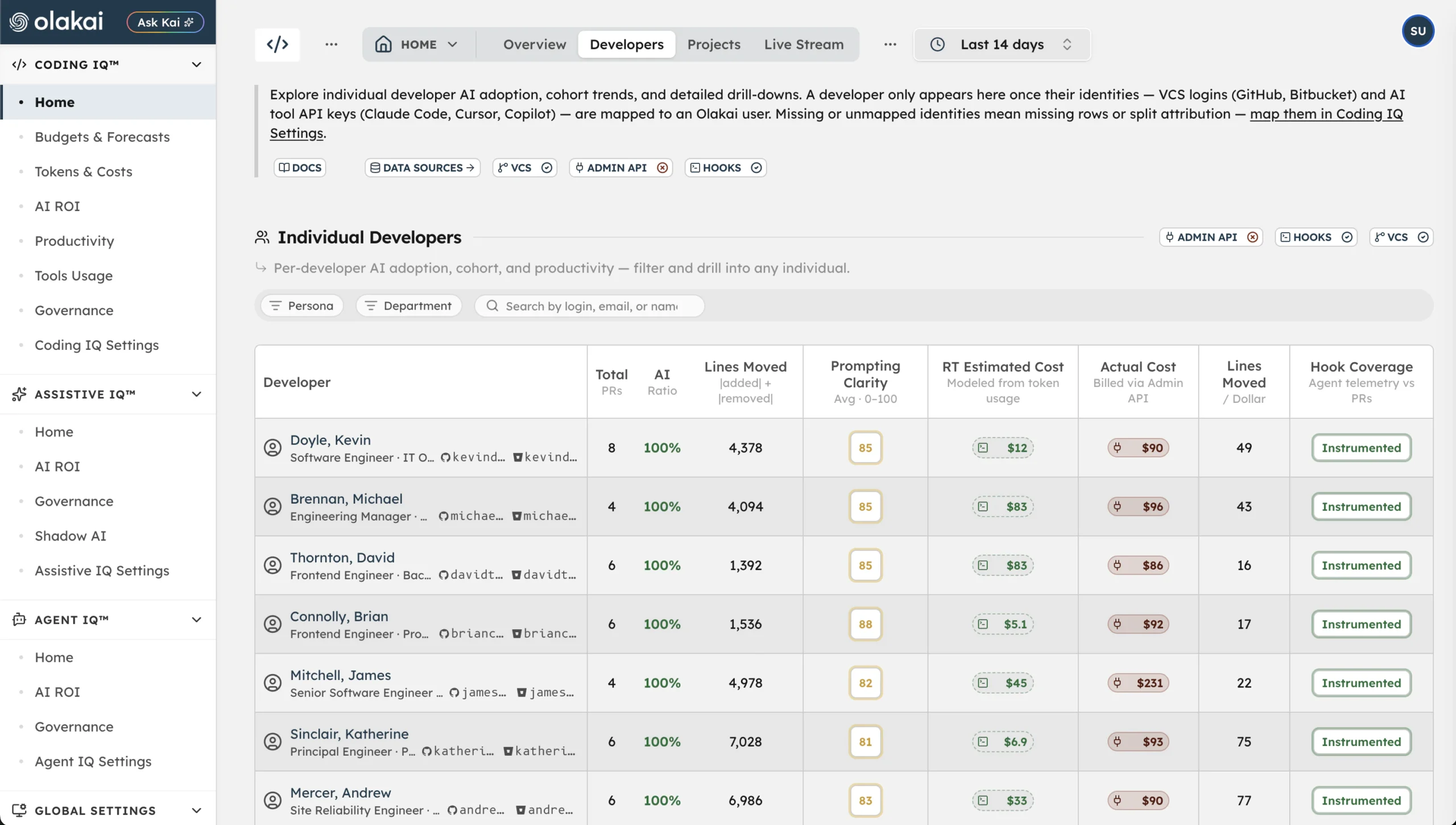
Developers
Find the idle licenses. Coach the casual users. Reward the power users.
Olakai Agentic segments every developer into one of four adoption cohorts and shows which tools they actually use, how often, and what their cycle time looks like compared to peers. It also attributes spend to each developer, estimated and reconciled actual cost side by side, so who is using what, and what it costs, is one table rather than a month-end reconciliation project.
- Power, casual, new, and idle cohorts by AI-assisted PR share
- Per-developer tool mix across Claude Code, Cursor, Copilot, Codex, and Gemini
- Per-developer cost, with the attribution method shown
Budgets, alerts, and runaway agents
What a runaway agent costs depends on how fast you find out.
A looping agent at twenty runs a minute is a budget problem measured in hours. Olakai Agentic fires threshold and forecast alerts daily on every budget, routes them to an owner, and, where you configure it, checks the remaining budget before a call is made. The calculator shows the difference between those three postures for a loop you describe yourself.
Interactive example of the loop-exposure calculator. Four sliders, loop frequency, cost per run, alert response time, and remaining budget before the cap, compare what a runaway agent costs under daily budget evaluation, an alert routed to an on-call owner, and a pre-call budget check. Illustrative data from the Olakai demonstration environment, not customer data.
Daily evaluation
The alert arrives at the next daily run; the loop has run all day.
Routed alert
An on-call owner gets it within the response time you set and stops the agent.
Pre-call budget check
The agent is refused before the call that would breach the cap. The loop costs the cap, nothing more.
Ask Kai
Ask Kai where to cut, and how much you’ll save.
Ask Kai in plain English, and it reasons across spend by provider, model, developer, and project, then surfaces the specific moves: idle licenses to reclaim, expensive models to swap for cheaper ones, budgets to set before the next overrun. Every answer shows its reasoning and the dollar impact, and Kai can set the budget in the same conversation.
- “Which models are driving our spend, and where can we drop to a cheaper one?”
- “Which seats and licenses are going unused this month?”
- “Set a budget for the platform team and alert me before we hit 80%.”
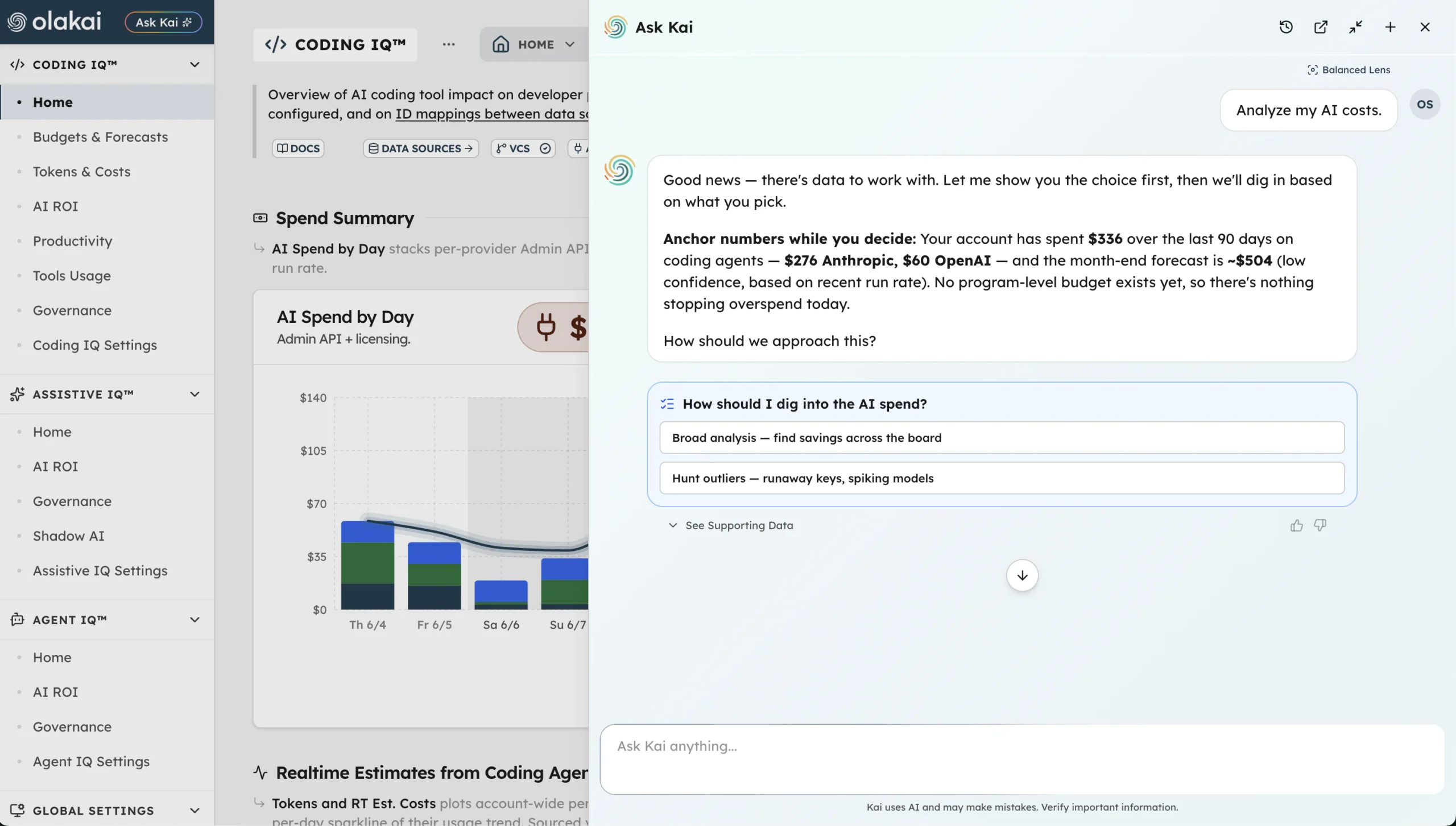
Forecasts are run-rate projections with a stated confidence level, not guarantees, and per-developer cost is a calibrated allocation, not an exact bill. Olakai says so on the screen.
Governance, scoped to code
Velocity and spend visibility never come at the expense of knowing what is leaking into prompts.
Olakai Agentic watches coding-agent traffic for PII, PHI, and secrets, scores every turn against your risk threshold, and keeps the agent’s actions, shell commands, file edits, and the systems it touched, on the record. The coding risk surface is kept separate from the autonomous-agent surface so the two never double-count. See governance and guardrails and the AI Governance use case.
Interactive example of turns by work type: bars for the number of turns in each kind of work, with a second axis of dots showing the share of those turns at or above the risk threshold, sortable either way. Illustrative data from the Olakai demonstration environment, not customer data.
Turns by work type
What the agents spent their turns on, with the share at or above the risk threshold for each.
Sensitive data in prompts
PII, PHI, and secrets detected in coding-agent traffic, counted per turn.
Audit coverage
Prompt, response, model, tokens, latency, tool calls, and timestamp recorded for every instrumented turn.
One platform
Olakai Agentic doesn’t live in a silo.
“Are we forecast to overrun any coding budget this month, and which team is driving it?”
It runs on the same platform as Olakai Assistive, so the engineering velocity, spend, and agent story rolls up into the same enterprise AI ROI dashboard your CFO and CAIO are already looking at. And because everything flows through Kai, you can ask your AI program a question in plain English and get a reasoned answer in seconds. Pricing starts at $25 per developer per month, with a free pilot to start; see pricing.