The Platform | Olakai Agentic · Olakai Assistive
Track every copilot. Catch every shadow AI.
Your employees use a lot more AI than IT thinks. ChatGPT, Microsoft Copilot, Google Gemini, Claude, Perplexity, Harvey, Descript, Jasper, Writer, Notion AI, and 1,100+ more show up in the enterprise stack every month. Olakai Assistive sees all of it, approved, unapproved, and quietly buried inside your SaaS apps, and turns it into value, seat economics, and policy you can enforce.
Interactive example of the unapproved-applications map. Each bubble is one AI application nobody approved, placed by the number of people using it and interactions on logarithmic axes, sized by volume; the pills filter by category; hover a bubble for its figures. Illustrative data from the Olakai demonstration environment, not customer data.
Most enterprises track 5 AI tools. The reality is closer to 50.
Every team has signed up for an AI tool you have never heard of. Marketing has Jasper. Sales has Apollo. Legal has Harvey. Design has Gamma. Engineering has Perplexity. The tools your CIO approved are the tip of an iceberg; the rest is being expensed quietly, used daily, and feeding sensitive data into systems nobody has reviewed.
Olakai Assistive deploys through a browser extension and surfaces every AI tool your team is actually using, including the ones nobody approved. Then it measures each one: value created, time saved, seat cost, prompt risk, and policy status, in the same view. See shadow AI discovery and the AI Governance use case.
1,100+
AI applications recognized, plus unknown tools flagged on first use
43%
of data breaches in 2026 involved shadow AI, up from 20% (IBM)
What it does
ROI, control, and real adoption, for every AI tool your people touch.
Measure
ROI for every AI tool
Every assistive AI interaction measured against productivity outcomes: time saved, value created, cost per seat, adoption depth. Across 1,100+ tools your team is actually using, from ChatGPT and Microsoft Copilot to Harvey, Descript, and Perplexity. The AI ROI answer for the workforce.
Govern
Shadow AI control
Detect every unauthorized AI tool the moment an employee starts using it. Enforce acceptable-use policy on every prompt. Govern what sensitive data your teams can send to which tools. The shadow AI surface, finally visible, and finally controllable, with governance and guardrails.
Adopt
Adoption that’s actually real
Benchmark adoption by department, region, role, and team. See which groups are getting real value from a tool and which are just clicking through it. The data your CAIO needs to decide what to scale, what to consolidate, and what to retire, with custom KPIs for the outcomes that matter.

Overview
AI value, time saved, and risk, in one dashboard.
The overview gives leaders the four numbers that matter most: dollars of AI value created, hours saved, total tool cost, and data risk exposure. Track ROI in real time, segmented by team and tool. The board-ready view of your assistive AI program.
- AI value created and total time saved across every assistive tool
- Total licensing cost against utilized licenses, with reclaim recommendations
- Live data risk indicators (PII, PHI, code, security) per tool and per team
License management
Find the seats you’re paying for. And nobody’s using.
Every AI tool charges per seat, and every enterprise over-provisions. Olakai Assistive shows exactly which licenses are sitting idle, by tool, by team, by user, and gives you a precise reclaim list. Then it layers in what your CAIO needs: which tools overlap, which can be consolidated, and which are quietly delivering ten times more value than the headline product. The procurement view that pays for the platform in the first quarter.
Interactive example of the seat economics calculator. The value-of-an-hour slider sets what a saved hour is worth; the light-use slider sets how many licensed interactions count as light use. Together they drive seat return, idle seat cost, the light-user count, the per-app active-versus-configured seat table, and the histogram of interactions per person. Illustrative data from the Olakai demonstration environment, not customer data.
Seat return
Value created in licensed applications against the configured seat cost, per app and in total.
Idle seat cost
Seats paid for with no active user this period, as a monthly figure you can act on at renewal.
Light users
People under an interaction threshold you set, with the histogram showing where the threshold cuts.
App-level detail
Analytics and governance down to the individual app.
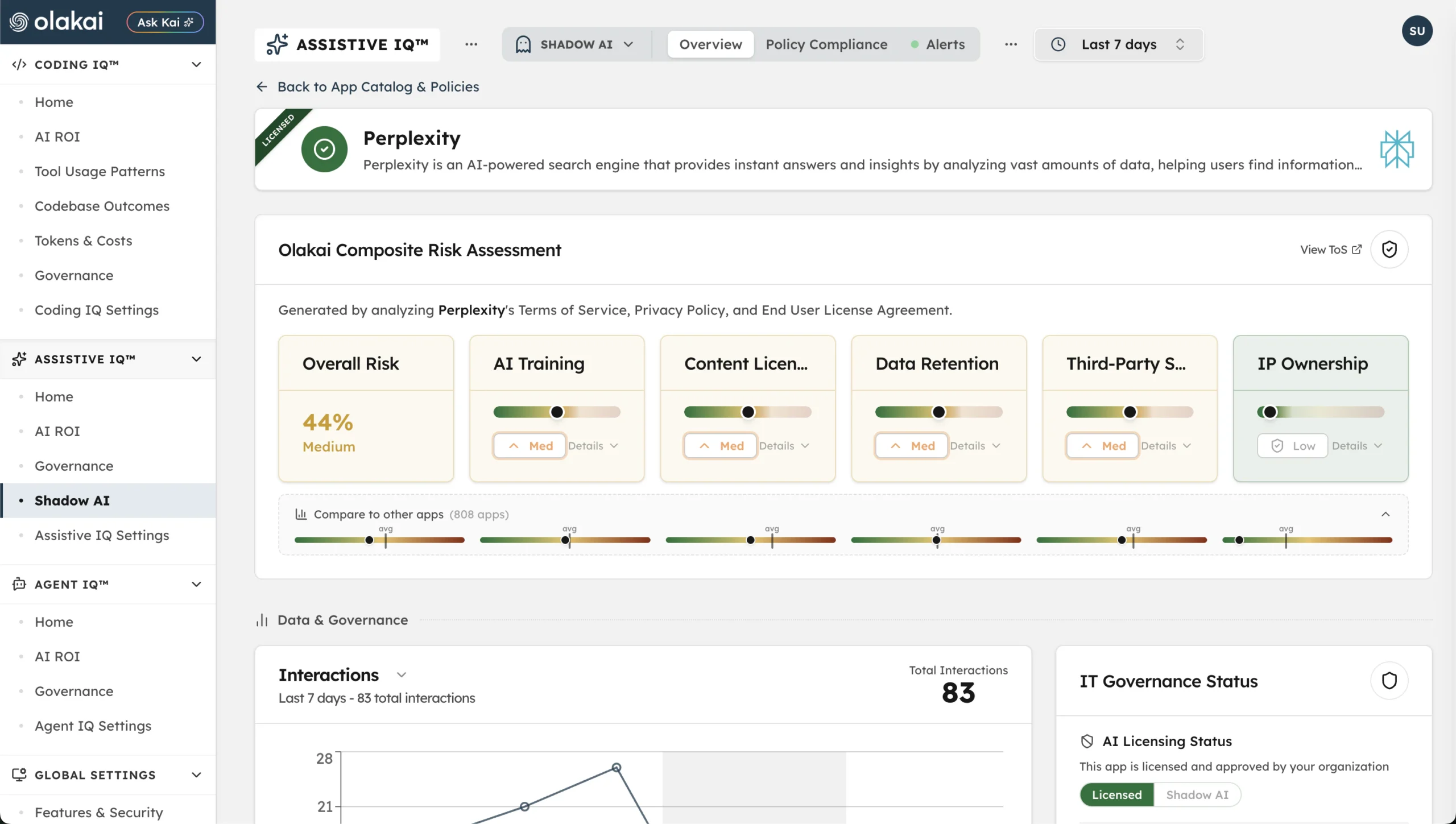
Click into any AI tool, Perplexity, ChatGPT, Copilot, or any of the 1,100+ apps Olakai Assistive tracks, and see its value created, time saved, cost, prompt quality, and data risk in one view. IT governance status, licensing, and risk level sit right next to the analytics, so measurement and control live in the same place.
- Per-app ROI: value created, time saved, and cost trend over time
- Prompt quality scoring and data risk indicators (PII, PHI, security)
- IT governance status: licensed or shadow AI, risk level, monitoring configuration
Sensitive data
Know which credentials and which data left, through which app.
Olakai Assistive inspects prompts and uploads for credentials, PII, PHI, and confidential material before they leave, scores every application’s average risk against your threshold, and counts the credential-carrying interactions per app, licensed and disallowed alike. It is the evidence behind the policy, and the reason a CISO can say yes to a tool with conditions rather than no. See complete AI monitoring.
Interactive example of the sensitive-data view: credentials split licensed versus disallowed, average risk score per application as a dot plot against the 0.6 threshold, and credential-carrying interactions by app. Illustrative data from the Olakai demonstration environment, not customer data.
Credentials, licensed and disallowed
How many credential-carrying interactions went to approved tools, and how many to tools nobody approved.
Risk score per app
Each application’s average risk plotted against the 0.6 threshold, so the review list writes itself.
Per-app counts
Credential-carrying interactions by application, ranked.

Shadow AI detection
Catch shadow AI before it becomes a compliance incident.
The browser extension surfaces every unauthorized AI tool the moment an employee starts using it, even if it never showed up in your SSO logs or expense reports. Then Olakai ranks each by risk surface: which tools are processing PII, which departments are most exposed, which prompts contain sensitive data. Govern. Approve. Block. Backed by real usage data, not guesswork.
- 1,100+ AI applications recognized, plus unknown tools flagged on first use
- Users, sessions, and data categories per app, by department
- Approved, review, and blocked status with the owner who decided
One platform
Olakai Assistive doesn’t live in a silo.
“Has Harvey usage actually grown since we rolled it out to legal, and is it worth standardizing on?”
It runs on the same platform as Olakai Agentic, so the assistive AI story rolls up into the same enterprise AI ROI dashboard your CFO and CAIO are already looking at. And because everything flows through Kai, you can ask your AI program a question in plain English and get a reasoned answer in seconds. Pricing starts at $5 per employee per month, with a free pilot to start; see pricing.