
Use case: AI Governance
Govern every AI tool and agent. Including the ones nobody approved.
Shadow AI was a factor in 43% of data breaches in 2026, up from 20% a year earlier, and 92% of organizations that had an AI incident lacked proper AI access controls. Olakai discovers every AI tool and agent your people use, enforces policy where the work happens, catches sensitive data before it leaves, and keeps the audit trail. Governance tied to value, so you know what to keep, fix, or kill.
Interactive example of shadow AI visibility: weekly interactions with disallowed applications, the most-used disallowed apps with their user counts, and the same usage by department. The spike is one week in which a disallowed tool spread through engineering. Illustrative data from the Olakai demonstration environment, not customer data.
A policy PDF does not govern anything. Visibility does.
IBM‘s 2026 Cost of a Data Breach report found shadow AI involved in 43% of breaches and added about $750,000 to the average breach cost. A 2026 OneTrust survey of 1,200 organizations found 87% encourage employees to use AI agents while 47% have clear controls over them. The gap is not intent. Most companies have an acceptable-use policy. What they lack is a view of which tools are actually in use, what data goes into them, and what the agents built on them are doing.
Olakai governs from measurement, not from paperwork: discover everything, enforce policy at the point of use, and rank each risk by the business value at stake. That last part is what compliance-first tools cannot do, and it is why shadow AI is also an opportunity: the unapproved tool your team adopted is often the one producing the return, and Olakai Assistive measures both sides of it.
43%
of data breaches in 2026 involved shadow AI, up from 20% a year earlier (IBM Cost of a Data Breach)
92%
of organizations that had an AI incident lacked proper AI access controls (IBM, 2026)
47%
have clear controls over the AI agents their employees are encouraged to use (OneTrust, 2026)
What you get
What you get with Olakai
Discover
Every tool and every agent
ChatGPT, Claude, Copilot, Gemini, Perplexity, and 1,100+ AI apps, plus the browser extensions, embedded AI features, and autonomous agents nobody registered. Shadow AI discovery across your workforce and agent oversight across your automations, in one catalog.
Enforce
Policy where the work happens
Allow, warn, or block by role, tool, and data type. Data loss prevention that catches PII, credentials, and confidential material in prompts and uploads before they leave. Real-time, not a quarterly review. See governance and guardrails.
Prove
Evidence for the auditor and the board
Who used which AI, with what data, producing what outcome, retained as evidence. The record you hand to the EU AI Act, NIST AI RMF, or ISO/IEC 42001 reviewer, and the same record that shows the board which risks are worth carrying because of what they return.
Olakai Assistive: unapproved applications
Every AI tool in use, by how many people and how often. Including the ones nobody approved.
Olakai Assistive builds a living map of the AI applications your people actually use: how many people, how many interactions, and what category each tool belongs to. Unapproved tools appear the first time someone opens one, so the map replaces the annual survey nobody answers honestly. Each one then gets a call: license it, review it, restrict it, or standardize on it. That is how shadow AI discovery turns from a blind spot into a decision list.
Interactive example of the unapproved-applications map. Each bubble is one AI application nobody approved, placed by the number of people using it and the number of interactions, on logarithmic axes, and sized by volume. The pills filter by category; hover a bubble for its figures. The table beneath records the recommended call for each group, licence, review, restrict, or standardize, and the usage it rests on. Illustrative data from the Olakai demonstration environment, not customer data.
People against interactions
Every unapproved app plotted by how many people use it and how much, sized by volume, so a tool used heavily by three people and one used lightly by sixty are both visible.
Filter by category
Chat assistants, coding tools, meeting bots, writing aids and the rest, each a pill, so the review happens one category at a time.
A call for each one
License, review, restrict, or standardize, with the usage basis for the call next to it. The output is a decision list, not a report.
Olakai Assistive: policy and enforcement
Write the policy once, in plain language. Olakai evaluates every interaction against it.
A policy in Olakai is a sentence a person can read, with a status, an identifier, a scope, and the risk it addresses. Every interaction is captured, evaluated against the policies in scope, scored for risk, reviewed where the score demands it, routed to the right owner, and reported, the same six steps whether the interaction came from a chat assistant, a coding agent, or an autonomous workflow. Governance and guardrails and complete AI monitoring are the same pipeline read at two points.
Interactive example of the policy framework. Each tab is one acceptable-use policy with its plain-language text, status, identifier, scope, and the risk it addresses; beneath it, the six-step flow (capture, evaluate, score, review, route, report) that every interaction passes through regardless of which AI motion produced it. Illustrative data from the Olakai demonstration environment, not customer data.
Plain-language policies
Each policy’s text, status, identifier, scope, and the risk it addresses, in one place, so security, legal, and the people it applies to read the same thing.
Six steps, every interaction
Capture, evaluate, score, review, route, report. The flow is identical across assistive tools, coding agents, and autonomous agents.
Everything is on the record
Every evaluation is an event with the user, the tool, the policy, the score, and where it was routed, which is the audit trail without a separate audit project.
Kai: governance you can question
Ask what is at risk. Get the answer ranked by what it is worth.
Kai answers governance questions across both products with its reasoning shown: which tools carry unreviewed PII exposure, which agents ran outside their scope this week, and which risky tool is also the one saving a department 400 hours a month. That last answer is the one that lets a CISO say yes with conditions instead of no.
- “Which unapproved AI tools handled customer data this month?”
- “Did any agent act outside its permissions this week?”
- “If we block this tool, what productivity do we lose?”
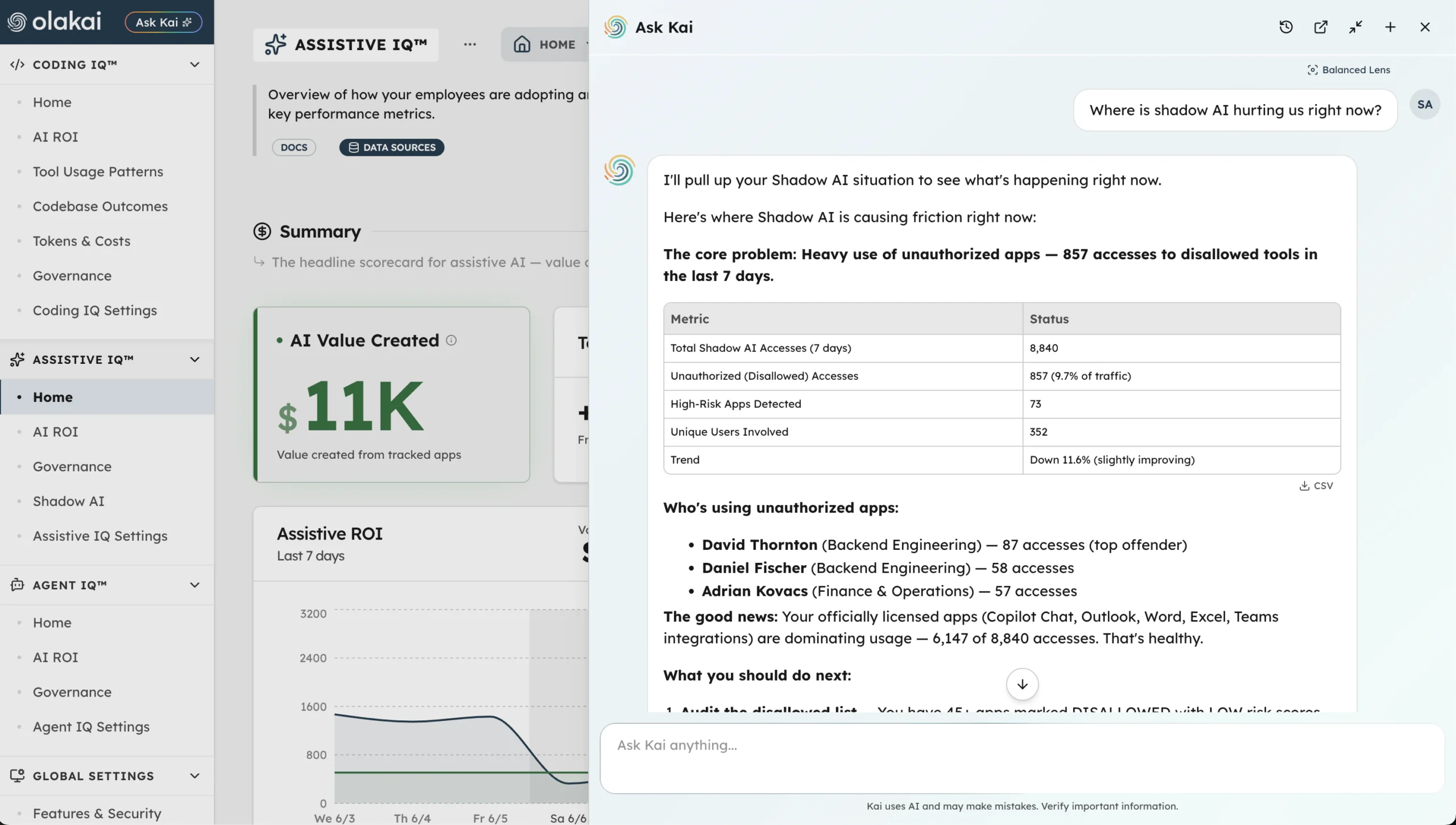
Governance that only measures risk will always say no. Olakai measures risk and value on the same data, so the answer can be yes, within these limits.
Related use cases
Governance and ROI are the same dataset read two ways.
“What AI is in use, what data is it touching, and which of those risks are worth carrying?”
The interactions Olakai governs are the interactions it measures. That is why ROI, spend control, and engineering impact come from the same platform, and why governance here never has to slow the program down to protect it. Available as SaaS or on-prem inside your own perimeter; see Trust and Security for how the platform itself is run, and agent governance for the autonomous side.
Use case
AI ROI
Value created versus cost for every copilot, coding tool, and agent, rolled up to one number the board trusts.
Use case
FinOps for AI
Allocation by team and project, run-rate forecasts, and alerts before the overrun. Cost per PR, not cost per token.
Use case
AI Engineering Productivity
Cycle time, review time, and cost per PR for AI-assisted work, measured on your own repos. Nothing to install.