

“We have a Shadow AI problem” is a sentence a CISO says a lot and rarely means precisely. It could mean dozens of unclassified tools nobody’s looked at in a month, or it could mean three specific employees pasting client data into an unapproved chatbot right now. Those are different emergencies requiring different responses, and treating them as one vague problem is how real incidents sit unnoticed inside a 30-day summary chart. Olakai’s Shadow AI module inside Olakai Assistive is built around exactly that distinction: three tabs, answering three different questions, on purpose.
As the product’s own framing puts it: Shadow AI is the AI usage your IT and security teams don’t know about. Until an app is classified, there’s no way to enforce policy, attribute cost, or flag sensitive-data exfiltration against it. Everything below exists to turn unknown, unclassified usage into something a security team can actually act on.
Overview: the 30-day triage workspace
The Overview tab is where a security team starts the day. It’s split into four secondary filters — All, Authorized, In Review, and Unauthorized — each carrying a count badge, and the intended workflow is explicit: start in All to see the whole picture, then treat In Review as the actual day-to-day work queue, since those are the apps still waiting on a classification decision. Two headline cards frame the exposure at a glance: Shadow AI Risk, the percentage of detected apps rated medium or high risk, and Shadow AI Apps, a breakdown of how many are OK, Not OK, or still Under Review.
The apps table underneath isn’t a static report — it’s editable in place. Status, risk rating, and an Advanced Monitoring toggle can all be changed directly from the row, which is what makes this the actual triage surface rather than a read-only summary someone screenshots into a slide. One detail worth knowing before trusting the defaults blindly: Advanced Monitoring is on by default for newly detected apps, but any app detected before that default existed keeps whatever setting it already had — worth an explicit check on older entries rather than an assumption that everything’s covered.
Alerts: what’s happening right now, not last month
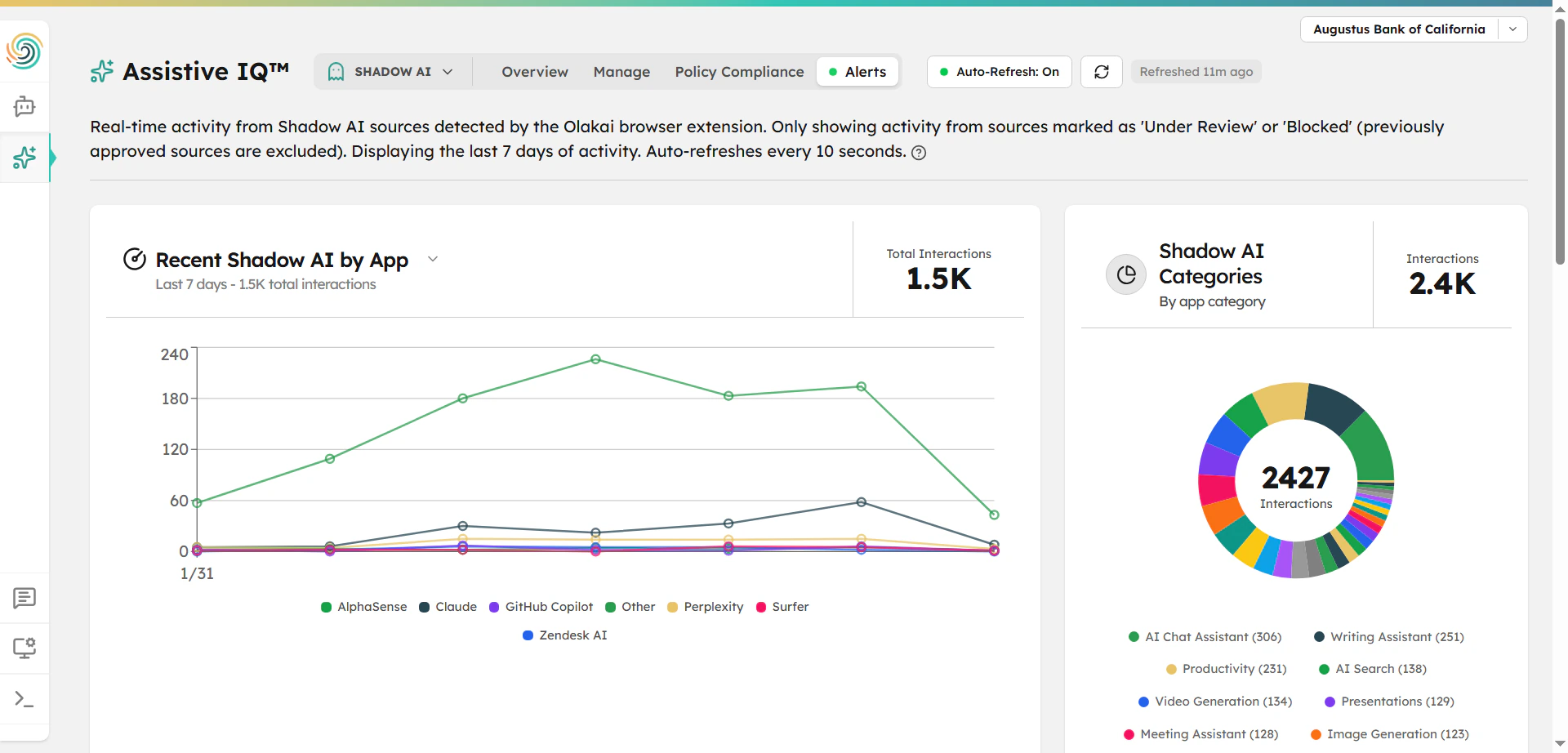
Overview answers what’s happening over a 30-day window. Alerts answers what’s happening right now — a live feed showing only apps currently marked Under Review or Blocked, deliberately excluding anything already approved so the feed doesn’t fill up with resolved, harmless activity. It covers the last 7 days and auto-refreshes every 10 seconds. This is the view to keep open when a new tool is spreading fast or a sensitive interaction might be happening in real time, not the 30-day chart that would only show that spike days later.
A second chart on the Alerts tab segments current activity by app category — Productivity, Communication, Coding, Data, and similar buckets — and the category itself is a useful triage signal on its own. A spike in Data or Communication apps generally warrants faster investigation than the same-sized spike in Productivity tools, simply because the surface area for sensitive-data exfiltration is larger in the former. When a chart spike does grab attention, the activity table underneath lets a security team identify the specific early adopters of a new tool — usually a faster and less heavy-handed move than a broadcast policy announcement, and one that tells you why the tool was being used in the first place, which often determines whether the right response is authorizing it, licensing it, or blocking it outright.
Policy Compliance: the audit-ready evidence trail
The third tab is where Shadow AI governance turns into something an auditor can actually verify. Acceptance is captured entirely through the Olakai browser extension — the first time an employee visits a covered app, the policy appears in-page, no separate Olakai login required. One acknowledgment is recorded per employee, per policy, per app, so a policy covering ChatGPT, Claude, and Gemini gets acknowledged separately for each one an employee actually visits, not once for all three.
The versioning behavior is the sharpest, most defensible part of the mechanism: a policy cell only shows green when every recorded acceptance is on the current published version. Publish a revised policy, and previously-green cells turn amber until each affected employee re-accepts the new version, app by app — nothing quietly stays marked compliant against an outdated policy text. And “applicable” is precisely scoped rather than blanket: a global policy applies to everyone, but an app-specific policy only applies to an employee who has actually used that app, ever. Someone who’s never opened ChatGPT isn’t behind on a ChatGPT policy, and an employee with zero applicable policies counts as compliant by default because there’s nothing for them to acknowledge. That precision is exactly what a security reviewer wants to see, and exactly what a cruder “did they click accept” tracker can’t give you.
Why three tabs beats one dashboard
The reason this is three separate views instead of one combined Shadow AI dashboard is that “what’s out there,” “what’s happening right now,” and “who has agreed to use it responsibly” are three genuinely different questions with three different urgencies. Compliance-focused AI governance platforms tend to stop at the third question — policy status, audit trail, nothing tied to real usage, which is why Shadow AI keeps showing up as a governance crisis in survey after survey. Olakai’s Shadow AI module answers all three from the same underlying detection data, which is what “govern without blocking” looks like in practice: triage and classify first, escalate to blocking only when the evidence actually supports it.
Classification decisions on this table don’t have to happen one click at a time, either — Kai can approve, block, or re-risk-rate apps conversationally, including in bulk, with every change surfaced for approval first. None of this requires manually chasing spreadsheets or waiting for a quarterly audit to find out what employees are actually using. Talk to an Expert to see what Olakai’s Shadow AI detection turns up inside your own organization.